Best AI Writing Tools for Fast and Easy Content Creation
Learn about the best AI writing tools that make content creation fast and effortless. Perfect for bloggers, marketers, and anyone who writes regularly.
Hasan Wazid

Writer's block, tight deadlines, and endless content demands—these challenges face every content creator, blogger, marketer, and business professional. In 2026, AI writing tools have evolved into sophisticated assistants...
Too long? Ask AI to summarize
Get a quick summary of this article using your favorite AI assistant
Why AI Assistants Transform Modern Writing
Writer's block, tight deadlines, and endless demands challenge every creator—and this is exactly why AI writing assistants in 2026 have become essential tools for modern professionals. Bloggers struggle to maintain publishing schedules. Marketers need compelling copy on impossibly short timelines. Business professionals draft countless emails, reports, and presentations. Students organize complex research into coherent papers. Entrepreneurs craft website copy without professional copywriters.
These challenges face millions of professionals daily. Traditional approaches consume excessive time and mental energy. Staring at blank pages drains creativity and productivity. Overthinking every word leads to paralysis rather than progress.
Enter artificial intelligence assistants in 2026. These sophisticated platforms help you draft faster, write better, and work more efficiently. They don't replace your creativity—they amplify it. Think of them as intelligent collaborators who handle the heavy lifting. You guide the creative direction while they generate initial drafts. Together, you produce compelling text in a fraction of traditional time.
Whether you need blog posts, social media captions, professional emails, or marketing copy, these platforms accelerate the process dramatically. Best part? You don't need professional writing experience. The technology handles technical aspects while you focus on ideas and strategy.
This comprehensive guide explores the top AI assistants specifically chosen for their ability to accelerate creation without compromising quality. We'll examine features, pricing, ideal use cases, and practical implementation strategies. By the end, you'll know exactly which platforms fit your specific needs and workflow.
Understanding AI Writing Technology
What These Platforms Actually Do
AI assistants are software applications that use artificial intelligence to help create written text. They work by understanding your input—whether it's a topic, outline, or simple description. Then they generate relevant, coherent text based on that information.
These platforms use large language models trained on vast amounts of text. They've analyzed millions of documents, articles, books, and websites. This training enables them to understand language patterns, grammar rules, and stylistic conventions.
Core Capabilities:
Generate original text from prompts and ideas. Complete sentences and paragraphs automatically. Suggest improvements to existing drafts. Adapt tone and style for different audiences. Correct grammar and enhance clarity instantly. Brainstorm ideas and outlines quickly.
The technology has matured significantly since early versions. Modern platforms produce remarkably human-like text. They understand context, maintain consistency, and follow instructions accurately. However, they still require human oversight for quality, accuracy, and authenticity.
Explore how AI technology is changing work
How the Technology Works
The process is remarkably straightforward and user-friendly:
Step 1: You provide input like topic, keywords, tone, and desired length. The more specific your instructions, the better the output quality.
Step 2: The AI processes your request using sophisticated language models. Neural networks analyze patterns to predict appropriate words and phrases.
Step 3: Generated text appears within seconds or minutes. Most platforms produce results nearly instantaneously.
Step 4: You review, edit, and refine the output. This human oversight ensures accuracy, authenticity, and alignment with your goals.
Behind the scenes, sophisticated neural networks analyze patterns in language. They predict what words and phrases should come next. This creates human-like text that flows naturally. However, these predictions aren't perfect. The technology can make mistakes, generate inaccurate information, or produce generic phrasing. Your editing transforms raw output into valuable, credible material.
Who Benefits Most
Bloggers and Content Creators: Generate articles, posts, and ideas faster than ever. Maintain consistent publishing schedules without burnout. Overcome writer's block with instant draft generation.
Marketers: Create compelling copy for ads, emails, and campaigns efficiently. Test multiple versions quickly for A/B testing. Scale production without expanding team size.
Business Professionals: Draft emails, reports, and presentations rapidly. Maintain professional tone consistently. Free up time for strategic thinking.
Social Media Managers: Produce engaging captions and posts consistently. Adapt messages for different platforms quickly. Maintain brand voice across all channels.
Students: Organize thoughts and improve writing quality. Generate outlines for papers and projects. Learn better phrasing and structure.
Entrepreneurs: Create website copy and marketing materials affordably. Compete with larger companies on messaging quality. Move faster from idea to execution.
Learn more about digital transformation tools
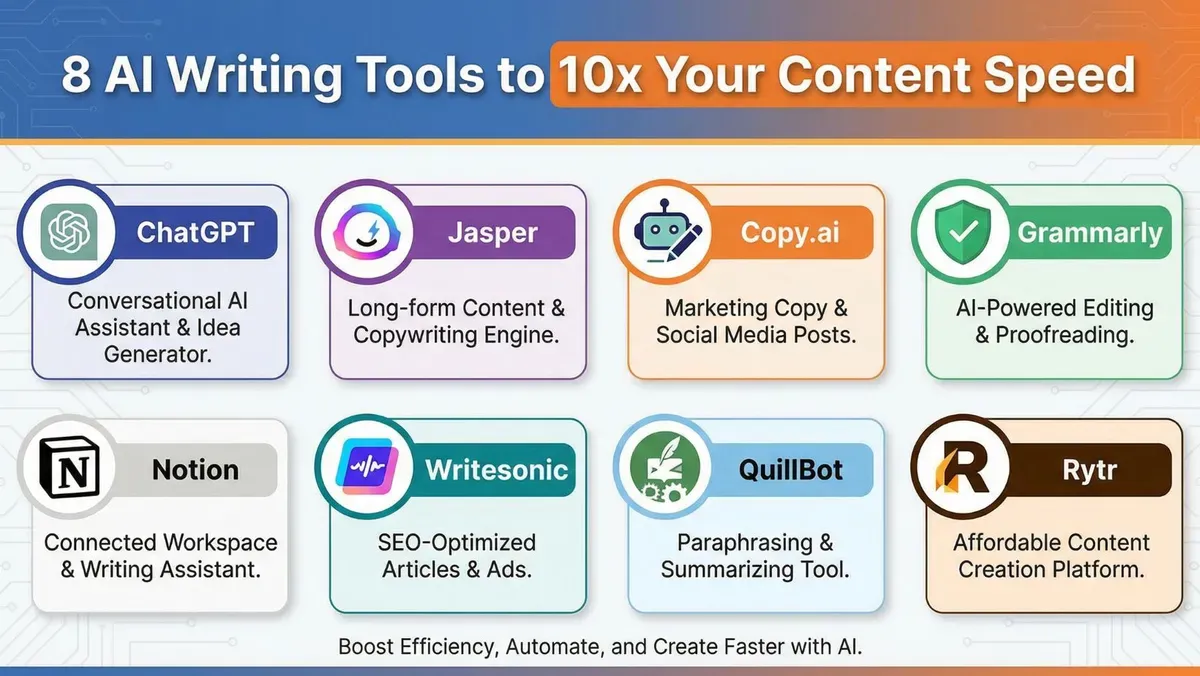
Top AI Platforms for Faster Creation
ChatGPT by OpenAI
Best For: Versatile text generation and brainstorming
ChatGPT remains the most popular AI assistant for compelling reasons. Its conversational interface makes creation feel natural and intuitive. It excels at virtually any task from blog posts to business emails.
Core Capabilities:
Conversational assistance makes interaction feel natural. Generate blog posts from simple topic descriptions. Create detailed outlines for any subject matter. Write in multiple styles from casual to formal. Edit and refine existing text with specific instructions. Brainstorm ideas when you're stuck on direction.
The platform's strength lies in its flexibility. Ask for changes and it adapts instantly. Request different tones and it adjusts appropriately. Expand specific sections and it elaborates naturally. This conversational approach lets you refine through dialogue rather than starting over.
Pricing Structure:
Free tier provides access to GPT-4o mini. ChatGPT Plus costs $20 monthly for GPT-4o access. Unlimited conversations included in both tiers. No hidden fees or word limits.
Ideal Applications:
Long-form blog posts and articles work exceptionally well. Article outlines structure your thinking efficiently. Ideation sessions generate dozens of angles quickly. Draft creation produces solid first versions. Rewriting and editing improve existing text.
Why Professionals Choose It:
The conversational approach feels intuitive and natural. You can refine through dialogue rather than complex interfaces. Multiple revisions happen in the same conversation. The free tier provides substantial capability for testing.
For a complete overview of free AI platforms including assistants, check out our guide on Best Free AI Websites Everyone Should Try
Jasper AI
Best For: Marketing copy and business text
Jasper specializes in creating marketing-focused material. Templates designed for specific use cases like ads, product descriptions, and email campaigns accelerate creation. The platform understands marketing principles and persuasive techniques.
Core Capabilities:
Over 50 templates for specific marketing tasks. Brand voice customization maintains consistency. SEO optimization tools improve search rankings. Team collaboration features enable workflow management. Plagiarism checker ensures originality. Multi-language support reaches global audiences.
Templates accelerate creation significantly. Instead of starting from scratch, you fill in details. Jasper generates polished copy instantly. This approach works brilliantly for repetitive tasks like product descriptions or ad variations.
Pricing Structure:
Creator plan costs $49 monthly for individuals. Teams plan runs $125 monthly for collaborative work. 7-day free trial available for testing. Annual billing provides discount options.
Ideal Applications:
Marketing campaigns benefit from persuasive copy. Product descriptions convert browsers to buyers. Ad copywriting captures attention effectively. Email sequences nurture leads systematically. Landing pages convert visitors to customers.
Why Professionals Choose It:
Marketing-specific templates understand persuasion principles. Brand voice features maintain consistency across campaigns. SEO optimization helps visibility in search results. Team features support collaborative workflows.
Learn more about Jasper AI capabilities
Copy.ai
Best For: Quick copywriting and social media posts
Copy.ai focuses on speed and simplicity. Perfect for generating short-form text, social media posts, and marketing snippets. The interface prioritizes ease of use over complexity.
Core Capabilities:
Over 90 copywriting tools for specific needs. Blog post wizard guides article creation. Social media creator adapts for different platforms. Email generator produces compelling messages. Product descriptions highlight benefits effectively. Simple, intuitive interface requires minimal learning.
The focus on short-form text means results appear instantly. Generate ten headline options in seconds. Choose the best one immediately. This speed is invaluable for social media managers creating dozens of posts weekly.
Pricing Structure:
Free tier provides 2,000 words monthly. Pro plan costs $49 monthly for unlimited usage. Team plans available for collaborative work. Cancel anytime without penalties.
Ideal Applications:
Social media captions engage followers effectively. Ad headlines capture attention in crowded feeds. Email subject lines improve open rates. Product descriptions convert browsers to buyers. Quick idea generation overcomes creative blocks.
Why Professionals Choose It:
Speed matters when managing multiple social accounts. Short-form focus produces usable results immediately. Free tier allows extended testing before committing. Interface simplicity reduces learning curve dramatically.
Grammarly
Best For: Improvement and editing
While primarily an editing tool, Grammarly's AI suggestions dramatically improve speed. It catches errors and suggests improvements in real-time as you type.
Core Capabilities:
Real-time grammar checking fixes errors instantly. Tone adjustments ensure appropriate messaging. Clarity suggestions improve readability significantly. Plagiarism detection protects originality (Premium). Insights help you learn better practices. Works everywhere you type across platforms.
Grammarly works silently in the background. It monitors your text across emails, documents, social media, and web forms. Errors get caught immediately rather than during proofreading. This real-time assistance saves enormous time on revision.
Pricing Structure:
Free tier provides basic grammar checking. Premium costs $12 monthly for advanced features. Business runs $15 monthly per team member. Annual billing offers significant discounts.
Ideal Applications:
Polishing all text types ensures professionalism. Professional emails maintain credibility. Error-free documentation prevents misunderstandings. Tone consistency supports brand voice. Learning better practices improves skills over time.
Why Professionals Choose It:
It works everywhere without switching applications. Real-time correction prevents errors from publishing. Tone detection ensures appropriate messaging. The free version provides substantial value.
Notion AI
Best For: Organized creation and note-taking
Notion AI integrates assistance directly into the popular workspace tool. Perfect for organizing thoughts while creating text. The combination of structure and generation is powerful.
Core Capabilities:
Inline assistance appears within your workspace. Summarization condenses long documents quickly. Brainstorming support generates ideas rapidly. Translation features reach global audiences. Q&A on your notes finds information quickly. Seamless workspace integration maintains flow.
The integration with Notion's organizational tools is brilliant. Plan your structure while drafting text. Keep research, outlines, and drafts interconnected. This unified approach reduces context switching and improves focus.
Pricing Structure:
AI add-on costs $10 monthly per user. Requires Notion account (free available). 20 free AI responses for testing. Cancel anytime without losing workspace access.
Ideal Applications:
Planning keeps projects organized. Research organization centralizes information. Meeting notes capture important details. Knowledge management builds institutional memory. Collaborative work coordinates teams effectively.
Why Professionals Choose It:
Organization and generation happen in one place. No switching between applications. Research and drafts stay connected. Collaborative features support team workflows.
Writesonic
Best For: SEO-optimized blog articles
Writesonic emphasizes SEO features specifically. It helps you create text that ranks well while maintaining quality and readability. The platform understands search engine requirements.
Core Capabilities:
AI article generator produces long-form posts. SEO optimization improves search visibility. Chatsonic provides conversational AI interface. Image generation creates accompanying visuals. Fact-checking integration verifies claims. Multiple languages reach global audiences.
The focus on SEO means text is optimized for search engines automatically. Keyword integration happens naturally without stuffing. Readability stays high while satisfying technical requirements. This balance is crucial for bloggers and marketers.
Pricing Structure:
Free trial provides 10,000 words for testing. Unlimited plan costs $20 monthly. Business plans available for teams. Custom enterprise solutions for large organizations.
Ideal Applications:
SEO blog posts rank in search results. Keyword-optimized text attracts organic traffic. Long-form articles provide comprehensive value. Briefs guide writers effectively. Fact-checked material builds credibility.
Why Professionals Choose It:
SEO optimization is built-in rather than added later. Search visibility increases naturally. Readability doesn't suffer from optimization. Fact-checking reduces misinformation risk.
Learn more about SEO strategies
QuillBot
Best For: Rewriting and paraphrasing
QuillBot excels at taking existing text and rewriting it differently. Perfect for avoiding repetition and improving clarity. The technology understands meaning rather than just words.
Core Capabilities:
AI paraphrasing rewrites text intelligently. Multiple modes offer different approaches. Grammar checking fixes errors simultaneously. Summarization tool condenses long documents. Citation generator formats references properly. Tone adjustments change emotional impact.
Sometimes you know what to say but struggle with expression. QuillBot instantly provides alternative phrasings. This is invaluable when your first draft feels awkward or repetitive.
Pricing Structure:
Free tier allows 125 words per paraphrase. Premium costs $8.33 monthly (annual billing). Unlimited paraphrasing included in premium. Student discounts available.
Ideal Applications:
Rewriting improves clarity without changing meaning. Avoiding repetition keeps text engaging. Clarity improvements help readers understand. Academic papers meet style requirements. Repurposing adapts existing material.
Why Professionals Choose It:
Paraphrasing technology understands meaning deeply. Multiple modes offer different approaches. Affordable pricing makes it accessible. Free tier allows substantial testing.
Rytr
Best For: Budget-friendly generation
Rytr offers impressive AI capabilities at a fraction of competitors' costs. Ideal for freelancers and small businesses watching budgets carefully.
Core Capabilities:
Over 40 use cases cover diverse needs. 30+ languages reach global audiences. Tone selection ensures appropriate messaging. Plagiarism checker ensures originality. SEO analyzer improves search visibility. Chrome extension provides browser access.
The affordable pricing doesn't compromise quality significantly. You get capable AI assistance without breaking budgets. For freelancers and startups, this value proposition is compelling.
Pricing Structure:
Free tier provides 10,000 characters monthly. Saver plan costs $9 monthly. Unlimited plan runs $29 monthly. All plans include core features.
Ideal Applications:
Budget-conscious creators need affordable tools. Multiple text types from one platform. Freelance projects maintain profitability. Small business marketing stays affordable. Quick drafts accelerate workflows.
Why Professionals Choose It:
Affordable pricing makes AI accessible. Quality remains acceptable for most uses. Multiple use cases provide versatility. Free tier allows extended testing.
Comprehensive Platform Comparison

Feature Analysis
ChatGPT excels at versatile text generation. Starting price is free with $20 monthly upgrade. Strong free option available. Basic SEO features included. Limited team collaboration capabilities.
Jasper dominates marketing copy creation. Starting price is $49 monthly. Trial-only free access. Strong SEO features included. Yes, team collaboration supported.
Copy.ai specializes in quick copy generation. Starting price is free with $49 monthly upgrade. Limited free version available. Basic SEO features. Yes, team collaboration supported.
Grammarly focuses exclusively on editing. Starting price is free with $12 monthly upgrade. Good free version available. No SEO features. Yes, team collaboration supported.
Notion AI integrates with organizational tools. Starting price is $10 monthly. Trial-only free access. No SEO features. Yes, team collaboration supported.
Writesonic emphasizes SEO blog creation. Starting price is $20 monthly. Trial-only free access. Strong SEO features included. Yes, team collaboration supported.
QuillBot specializes in rewriting text. Starting price is free with $8 monthly upgrade. Limited free version available. No SEO features. No team collaboration.
Rytr offers budget-friendly generation. Starting price is free with $9 monthly upgrade. Good free version available. Basic SEO features. No team collaboration.
Choosing Your Platform
Beginners: Start with ChatGPT (free) or Rytr (affordable). These platforms offer gentle learning curves. Free tiers allow extended experimentation.
Marketing Focus: Choose Jasper or Copy.ai for specialized features. These platforms understand persuasion principles. Templates accelerate specific tasks.
SEO Priority: Pick Writesonic for search optimization. The platform balances visibility with readability. Keyword integration happens naturally.
Editing Needs: Use Grammarly for polishing text. Real-time correction prevents errors from publishing. Works everywhere you type.
Organization Matters: Try Notion AI for integrated workflows. Keep research, planning, and drafting connected. Reduce context switching significantly.
Tight Budgets: Go with Rytr or free tiers. Affordable pricing doesn't sacrifice too much capability. Perfect for testing before investing.
Getting Better Results
Crafting Effective Prompts
The quality of AI-generated text depends heavily on your instructions. Better prompts create dramatically better outputs. Here's how to improve your prompting skills:
Be Specific About Topics:
Poor example: "Write about coffee." This vague instruction produces generic results.
Better example: "Write a 500-word blog post about the health benefits of drinking coffee in moderation." This specific instruction produces focused, useful text.
Define Your Audience Clearly:
Poor example: "Write a product description." This lacks essential context.
Better example: "Write a product description for eco-conscious millennials interested in sustainable fashion." This specific audience focus produces relevant, targeted messaging.
Specify Tone and Style:
Poor example: "Write an email." This gives no style guidance.
Better example: "Write a friendly but professional email to a client explaining project delays." This clear tone instruction produces appropriate messaging.
Include Key Information:
Specify desired length for appropriate depth. List important points to cover completely. Mention keywords to include naturally. Describe call-to-action needed. Note format preferences like lists or paragraphs.
The more context you provide, the better the output quality. Specific instructions produce specific, useful results. Generic inputs create generic outputs requiring extensive rewriting.
The Complete Workflow
Step 1: Brainstorm and Outline
Use AI to generate topic ideas when you're stuck. Create structured outlines before drafting text. This planning prevents mid-draft confusion. Outline quality determines final structure.
Step 2: Generate Initial Draft
Let AI create the first version based on your outline. Provide detailed specifications for better results. Review the output critically before proceeding. Identify sections needing revision immediately.
Step 3: Review and Edit Critically
Read through AI-generated text carefully. AI provides the foundation; you add expertise. Insert personal insights and experiences. Verify all factual claims and statistics. Adjust phrasing to match your voice.
Step 4: Polish and Refine
Use editing tools like Grammarly for final polish. Ensure clarity and correct grammar throughout. Perfect tone for your specific audience. Check that flow feels natural.
Step 5: Add Personal Touch
Insert personal anecdotes that build connection. Add unique insights from your experience. Ensure your authentic voice shines through. Make the text truly yours.
This workflow transforms AI from a replacement into a collaborator. You guide the process while the technology handles tedious tasks. Together, you produce higher quality faster than either could alone.
Best Practices for Quality
AI Assists, You Direct
Think of AI as an assistant, not a replacement. You provide direction, expertise, and final judgment. The technology handles tedious tasks efficiently. Your creativity and insights add real value.
Always Fact-Check
AI can generate confident-sounding but incorrect information. Verify facts, statistics, and claims rigorously. Use authoritative sources for confirmation. Never publish without verification.
Maintain Your Voice
Edit AI text to match your personal or brand voice. Don't let everything sound generic and interchangeable. Your unique perspective is what connects with audiences. Generic text doesn't build relationships effectively.
Combine Multiple Platforms
Use ChatGPT for drafting initial versions. Apply Grammarly for editing and polishing. Try Writesonic for SEO optimization specifically. Platforms complement each other beautifully.
Iterate and Refine
First outputs are rarely perfect immediately. Request revisions with specific feedback. Try different prompts to compare results. Refine until you're truly satisfied.
If you're also creating visual materials alongside written text, explore our comprehensive guide on Best Image Creating AI Tools for Beginners
Practical Applications
Blog and Article Creation
Process:
Generate topic ideas and compelling headlines. Create detailed outlines structuring your argument. Draft introduction and body sections completely. Generate conclusion summarizing key points. Edit for voice and accuracy throughout. Optimize for SEO with keywords naturally integrated.
Time Savings: 50-70% compared to traditional approaches. What took hours now takes minutes. Publishing schedules become sustainable.
Best Platforms: ChatGPT, Writesonic, Jasper excel at long-form text.
Social Media Posts
Process:
Input campaign details and goals. Generate multiple caption options quickly. Adapt messages for different platforms. Create hashtag suggestions that increase reach. Schedule with platform-specific tools.
Time Savings: 60-80% on creation time. Social media managers produce more without working longer. Consistency improves dramatically.
Best Platforms: Copy.ai, Jasper, ChatGPT work excellently for short-form messaging.
Email Marketing
Process:
Define audience segments and campaign goals. Generate subject line options that improve opens. Create email body that drives action. Add personalization elements that increase engagement. Test different versions systematically.
Time Savings: 40-60% per email campaign. What took days now takes hours. Testing becomes practical.
Best Platforms: Copy.ai, Jasper, ChatGPT produce persuasive emails efficiently.
Business Communications
Process:
Outline key points needing coverage. Generate professional drafts quickly. Adjust tone appropriately for situation. Polish with editing tools. Personalize before sending.
Time Savings: 30-50% on routine communications. Professionals reclaim hours weekly. Focus shifts to strategy rather than drafting.
Best Platforms: ChatGPT, Grammarly, Notion AI handle professional communication excellently.
Common Mistakes to Avoid
Mistake #1: Publishing Without Editing
The Problem: Copying AI-generated text directly without review leads to problems. Factual errors slip through unchecked. Awkward phrasing reduces readability. Generic messaging fails to connect with audiences.
The Solution: Always review, edit, and personalize outputs thoroughly. Add your expertise and unique insights. Verify facts rigorously before publishing. Adjust tone to match your authentic voice. Inject personality that builds connections.
Why It Matters: Unedited AI text often lacks depth and authenticity. Your editing transforms generic drafts into valuable, credible material. This human touch differentiates your work from competitors.
Mistake #2: Using Vague Prompts
The Problem: Providing minimal context like "write a blog post about marketing" produces shallow, unfocused results. The AI lacks direction for creating useful text. Output requires extensive rewriting.
The Solution: Write detailed prompts specifying topic, audience, tone, length, key points, and desired outcome. More context produces dramatically better results. Specific instructions yield specific, useful text.
Why It Matters: Specific prompts save enormous time on revision. Generic inputs create generic outputs. Quality prompts are your most powerful tool.
Mistake #3: Not Fact-Checking Outputs
The Problem: Trusting AI-generated facts, statistics, and claims without verification spreads misinformation. AI can confidently present incorrect information ("hallucinations"). Publishing false information damages credibility permanently.
The Solution: Verify all factual claims rigorously. Check statistics against authoritative sources. Confirm dates, names, and technical information. Use multiple sources for important claims. When in doubt, remove questionable facts.
Why It Matters: Your credibility is your most valuable asset. False information destroys trust instantly. Recovery takes years if possible at all.
Mistake #4: Relying on Only One Platform
The Problem: Using a single AI platform for all tasks misses specialized tools. Different platforms excel at different text types. Limiting yourself reduces quality and efficiency.
The Solution: Build a toolkit using different platforms for different purposes. Use ChatGPT for drafting initial versions. Apply Grammarly for editing and polishing. Try Writesonic for SEO-optimized blog posts specifically.
Why It Matters: Different platforms have different strengths. Using the right tool for each task produces better results faster. Versatility improves output quality significantly.
Mistake #5: Ignoring Your Unique Voice
The Problem: Letting AI homogenize your style makes all text sound generic. Indistinguishable messaging fails to stand out. Audiences connect with personality, not generic text.
The Solution: Edit AI material to reflect your personality clearly. Insert personal anecdotes that build connection. Add unique insights from your experience. Maintain consistent brand voice throughout.
Why It Matters: Your unique perspective is what connects with audiences. Generic AI text doesn't build relationships effectively. Personality differentiates you from competitors using the same tools.
Conclusion: Transform Your Workflow
AI assistants have fundamentally transformed text creation in 2026. What once took hours now takes minutes. Writer's block becomes a minor inconvenience rather than a productivity killer. Quality material becomes accessible to everyone, not just professional writers.
The key to success is understanding these platforms are collaborators, not replacements. Use them to handle time-consuming parts like generating drafts, creating outlines, and brainstorming ideas. You focus on adding expertise, personality, and refinement that makes material truly valuable.
Your Action Plan
Today:
Choose one AI platform and create your first draft. Experiment with different prompt styles to find what works. Edit an AI draft to match your authentic voice.
This Week:
Try 2-3 different platforms systematically. Compare results for the same prompt. Establish your preferred workflow based on results.
This Month:
Build your complete toolkit of platforms. Develop prompt templates for common tasks. Measure time savings and quality improvements objectively.
Key Takeaways
Start with free tools like ChatGPT to experiment before investing. Master prompting since better instructions create dramatically better outputs. Always edit because your expertise makes AI material valuable. Combine platforms since different tools excel at different tasks. Verify facts rigorously because AI makes confident mistakes. Maintain authenticity by adding personal insights consistently.
The future of creation combines human creativity with AI efficiency. These platforms don't diminish the value of good writing—they make it more accessible and efficient for everyone.
Start today and discover how AI assistants can transform your creation process. Your productivity breakthrough awaits. The tools are ready; your success depends on implementation.
For a broader exploration of AI platforms beyond text generation, including research and productivity applications, visit our complete guide on
Never Miss an Update
Join thousands of readers getting the latest insights on technology, business, and digital marketing.