Shared vs VPS vs Dedicated Hosting: Complete Comparison Guide for 2025
Selecting between shared, VPS, and dedicated servers resembles choosing an apartment, condo, or house. Each serves unique needs and budgets.
Hasan Wazid

Introduction: Understanding Server Options Selecting between shared, VPS, and dedicated servers resembles choosing an apartment, condo, or house. Each option serves different requirements, budgets, and technical capabili...
Too long? Ask AI to summarize
Get a quick summary of this article using your favorite AI assistant
Introduction: Understanding Server Options
Selecting between shared, VPS, and dedicated servers resembles choosing an apartment, condo, or house. Each option serves different requirements, budgets, and technical capabilities. Your website's infrastructure needs depend on traffic volume, technical complexity, security demands, and financial constraints.
Many website owners start with the cheapest option. They don't understand the limitations initially. Performance issues emerge as they grow. Others overspend on powerful infrastructure their small site doesn't need. This guide clarifies what each server type offers. You'll discover which matches your specific situation perfectly.
Technology continues improving across all categories in 2026. Understanding fundamental differences matters more than ever. Your infrastructure investment shapes your online success significantly.
Learn more about how to choose the right web hosting provider
Shared Solutions Explained
What Defines Shared Infrastructure?
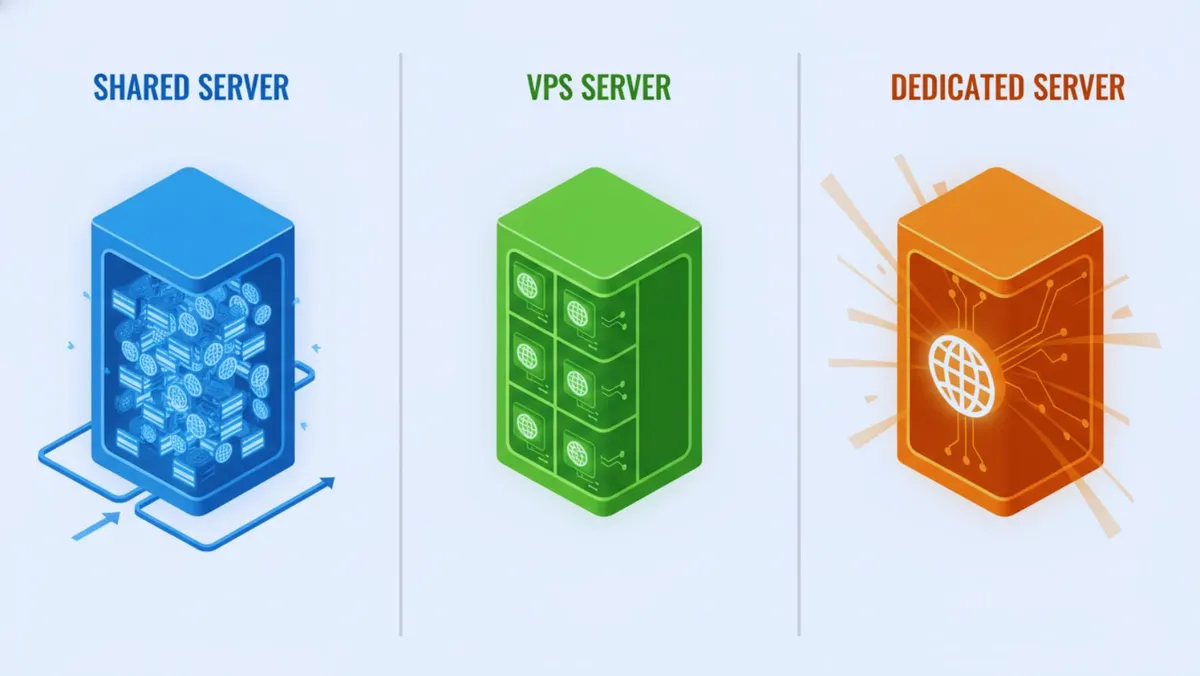
This approach places your website on a server alongside dozens or hundreds of others. All sites share the machine's resources. CPU processing power gets distributed among users. RAM memory allocation is divided automatically. Storage space and bandwidth are shared too. Living in an apartment building provides a perfect analogy. Residents share the building's utilities and infrastructure together.
How Resource Distribution Works
The provider manages resource allocation automatically. Each site receives a portion of available CPU capacity. RAM memory gets divided among all hosted websites. Bandwidth is distributed based on usage patterns. The hosting provider manages server maintenance completely. Security measures are pre-configured by the host. The environment offers limited customization options overall.
Your apartment residents share building amenities equally. Plumbing and electricity are distributed among everyone. One neighbor using excessive resources affects others. A loud party disrupts the peaceful environment. Similarly, resource-heavy websites impact server neighbors significantly.
Key Advantages
Budget-Friendly Pricing
Monthly costs range from $3 to $15. This makes it the most affordable option. New website owners benefit from low entry costs. Initial investments remain minimal for testing ideas.
Simple Management
Server settings come pre-configured for immediate use. User-friendly control panels simplify daily tasks. cPanel and Plesk interfaces require no technical expertise. One-click application installers speed up website deployment. Technical management responsibility stays with the provider.
Maintenance-Free Operations
The provider handles all server updates automatically. Security patches get applied without user intervention. Technical support comes included with every plan. Hardware issues become the host's responsibility entirely.
Rapid Deployment
Account activation happens instantly after purchase. Your website can launch within minutes. Pre-installed features are ready to use immediately. Templates and builders come included by default.
Notable Limitations
Resource Competition
Your site competes with neighbors for server resources. High traffic on other sites slows yours down. Limited ability exists to handle sudden traffic spikes. Restrictions apply to CPU and RAM usage. Bandwidth throttling may occur during peak times.
Performance Constraints
Loading speeds are slower than VPS alternatives. Traffic handling capacity remains limited by design. Processing power gets shared among all users. Database queries may slow during heavy usage periods.
Security Vulnerabilities
The "bad neighbor" effect poses real risks. One compromised site endangers all server residents. Shared IP addresses create potential security concerns. Limited security customization options are available.
Control Restrictions
Custom software installation isn't permitted typically. Limited access to server settings exists. Shared resources cannot be guaranteed exclusively. Certain applications may be prohibited entirely.
Growth Challenges
Fixed resource allocations limit expansion potential. Upgrading requires changing to different plans. Migration to VPS eventually becomes necessary. Traffic limitations restrict business growth significantly.
Ideal Use Cases
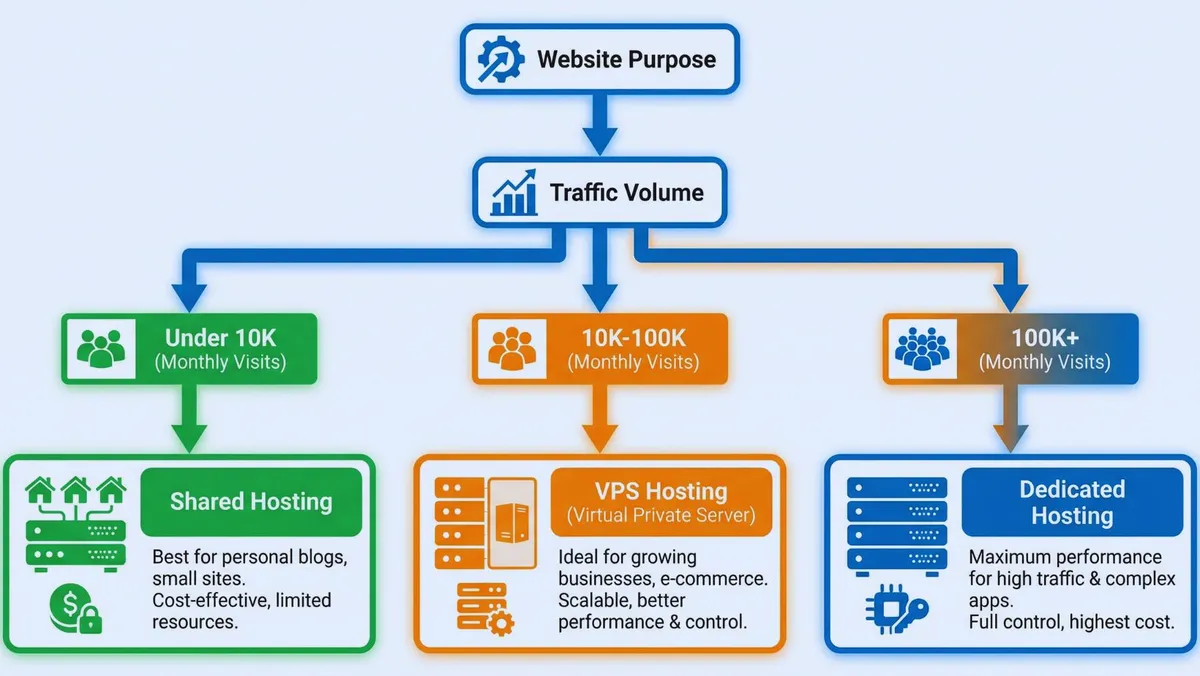
This solution works perfectly for several scenarios. Personal blogs benefit from low costs significantly. Small business websites under 10K monthly visitors thrive. Portfolio and informational sites operate efficiently here. New websites testing concepts minimize initial investment. Budget-conscious beginners start their journey here. Sites with predictable, steady traffic perform well.
However, certain situations require avoiding this option. E-commerce stores handling sensitive data need better security. High-traffic websites demand more reliable performance. Resource-intensive applications require dedicated processing power. Sites requiring custom configurations need greater flexibility. Businesses needing guaranteed uptime should explore alternatives.
VPS Solutions Explained
VPS technology divides physical servers into multiple virtual environments. Virtualization software creates isolated operating spaces. Each VPS functions as an independent machine completely. Dedicated resources belong exclusively to each instance. Operating systems run separately within each environment. Configuration independence allows complete customization freedom.
Owning a condo provides an excellent comparison. You possess your own private space entirely. Guaranteed resources belong to you exclusively. The physical building is shared with others. Your utilities remain separate from neighbors completely. Control over your space allows unlimited customization. Neighbor activities don't affect your resource access.
How Virtual Division Functions
Physical servers get divided into isolated segments. Each VPS receives dedicated RAM allocation permanently. CPU cores are assigned to specific instances. Storage space belongs exclusively to each environment. Resources remain guaranteed regardless of neighbor behavior. Root access provides complete server control capabilities.
Primary Benefits
Guaranteed Resources
Your allocated RAM stays yours exclusively always. CPU power doesn't fluctuate with neighbor activity. Storage space remains available at all times. Performance stays consistent hour after hour daily.
Superior Performance
Loading speeds exceed shared alternatives significantly. Traffic spikes get handled more effectively always. Consistent performance continues regardless of server neighbors. Resources scale upward with growing needs smoothly.
Enhanced Protection
Isolated environments separate you from other users. Custom security configurations become possible immediately. Private IP addresses come included by default. Better protection against attacks exists inherently naturally.
Greater Control
Root or administrator access comes standard typically. Custom software and applications install freely easily. Server settings configure according to your preferences. Operating system choice includes Linux and Windows options.
Scalability
Resource upgrades happen without migration requirements painlessly. RAM, CPU, or storage additions occur on demand. Vertical scaling accompanies site growth automatically seamlessly. Flexible resource management adapts to changing needs.
Cost-Effectiveness
Pricing falls between shared and dedicated options. Significantly better performance than shared alternatives exists. More affordable than dedicated server investments remain. Value proposition attracts growing website owners consistently.
Notable Drawbacks
Higher Investment
Monthly costs range from $20 to $80. This significantly exceeds shared pricing structures substantially. Budget constraints may limit accessibility for some.
Technical Requirements
Server management skills prove helpful frequently often. Linux or Windows administration understanding helps significantly. Responsibility for some configurations falls on users. Troubleshooting ability becomes necessary occasionally inevitably.
Maintenance Duties
Software updates may require manual intervention sometimes. Security patches need attention and timely application. Performance monitoring becomes your responsibility partially largely. Some technical management tasks require user involvement.
Physical Hardware Sharing
Resources are dedicated but hardware remains shared. Complete hardware failure affects all VPS instances. Physical server issues impact multiple users simultaneously.
Learning Investment
Control panels are more complex than shared alternatives. Settings and configurations require deeper understanding initially. The learning curve exceeds shared simplicity noticeably.
Best-Fit Scenarios
Growing websites outgrowing shared infrastructure benefit tremendously. Medium-traffic sites between 10K-100K monthly visitors thrive. E-commerce stores with moderate traffic operate securely efficiently. Developers needing custom configurations find perfect flexibility here. Businesses requiring better reliability upgrade to this level. Sites with variable traffic patterns handle fluctuations smoothly. Applications requiring specific software installations work perfectly well.
Some situations call for different solutions entirely though. Complete beginners with zero technical knowledge struggle initially. Very small sites with minimal traffic overspend unnecessarily. Extremely high-traffic enterprise sites need more power ultimately. Users wanting zero technical involvement should reconsider carefully.
Learn more about cloud storage solutions for your business
Dedicated Solutions Explained
Understanding Exclusive Servers
Dedicated infrastructure provides an entire physical machine exclusively. No sharing resources with anyone else occurs ever. Server space belongs to you alone entirely completely. Configurations remain under your control totally absolutely. Owning a private house provides the perfect analogy. Complete control over the property exists inherently naturally. All utilities and resources are exclusively yours forever. Space allocation decisions remain yours alone entirely completely.
How Exclusive Allocation Functions
The entire server dedicates to your website exclusively. All CPU cores become available for your use. RAM and storage allocate entirely to you alone. Full bandwidth capacity belongs to you completely totally. Complete hardware control provides ultimate flexibility always consistently.
Maximum Advantages
Ultimate Performance
All server resources serve your site exclusively always. Massive traffic volumes get handled effortlessly smoothly consistently. No performance impact from other users occurs ever. Optimal loading speeds remain constant continuously perpetually reliably.
Complete Control
Full root and administrator access comes standard guaranteed. Any software or applications install without restrictions completely. Custom server configurations adapt to exact requirements perfectly. Hardware specifications match your precise needs exactly ideally.
Superior Protection
Isolated physical environments eliminate neighbor risks entirely completely. No "bad neighbor" vulnerabilities exist at all ever. Custom security implementations deploy according to your standards. Dedicated IP addresses provide additional security layers naturally. Complete firewall control protects according to your policies.
Guaranteed Reliability
Dedicated resources ensure consistent uptime always perpetually reliably. No resource competition exists whatsoever at all ever. Predictable performance continues hour after hour continuously daily. Professional-grade hardware provides enterprise-level stability consistently constantly.
Customization Freedom
Operating system selection includes all available options. Hardware component choices match your exact specifications. Network settings configure according to your requirements perfectly. Specialized solutions implement without limitations or restrictions.
Unlimited Scalability
Hardware upgrades expand capacity when needed easily. Multiple sites can operate simultaneously effortlessly efficiently smoothly. Resource allocation flexibility adapts to changing demands. Load balancing distributes traffic optimally across resources.
Significant Drawbacks
Premium Pricing
Monthly costs range from $80 to $500 or more. This represents the most expensive option by far. Budget requirements eliminate many potential users immediately.
Expertise Requirements
Advanced server management skills become absolutely necessary mandatory. System administration knowledge proves essential for daily operations. Troubleshooting capability becomes critical for problem resolution quickly. Security responsibility falls entirely on your shoulders completely.
Maintenance Burden
You handle all updates and patches personally directly. Performance monitoring requires constant attention and vigilance consistently. Security implementations demand ongoing management and updates regularly. Technical issues require your personal resolution efforts.
Unnecessary for Most
Small to medium websites don't need this power. The expense becomes completely unjustified for them. Resource utilization remains low despite high costs.
Setup Complexity
Provisioning times extend longer than other options. Initial configuration demands significant technical expertise immediately. Migration challenges from other solutions arise frequently. Management learning curves prove steep for beginners.
Perfect Use Cases
High-traffic websites exceeding 100K monthly visitors thrive. Large e-commerce platforms handling thousands of transactions benefit. Enterprise-level applications requiring maximum resources operate ideally. Sites with strict security requirements meet compliance easily. Multiple high-traffic websites share resources efficiently effectively together. Resource-intensive applications run without performance compromises ever. Companies with IT teams manage infrastructure effectively efficiently. Businesses requiring maximum control achieve complete autonomy totally.
Some situations make this option inappropriate entirely though. Beginners without technical skills struggle significantly tremendously greatly. Small websites with low traffic waste money unnecessarily. Budget-conscious individuals find costs prohibitive entirely completely. Sites under 50K monthly visitors overspend dramatically significantly. Users wanting hands-off management should explore alternatives instead.
Side-by-Side Performance Analysis
Speed and Reliability Metrics
Capability | Shared Solution | VPS Solution | Dedicated Solution |
|---|---|---|---|
Loading Speed | Moderate | Fast | Fastest |
Uptime Guarantee | 99.5-99.9% | 99.9% | 99.95-99.99% |
Traffic Capacity | 1K-10K visitors | 10K-100K visitors | 100K+ visitors |
Resource Guarantee | None | Yes | Complete |
Scalability | Limited | Good | Excellent |
Learn more about website speed testing with GTmetrix
Investment Analysis
Solution Type | Monthly Investment | Annual Investment | Best Value For |
|---|---|---|---|
Shared | $3-$15 | $36-$180 | Budget sites |
VPS | $20-$80 | $240-$960 | Growing sites |
Dedicated | $80-$500+ | $960-$6,000+ | Enterprise |
Hidden costs require consideration when budgeting carefully. Shared plans usually include everything needed initially. check DigitalOcean VPS plans for transparent VPS pricing. VPS solutions may need control panel licenses. Managed services add extra monthly fees too. Learn more about Linode dedicated hosting for enterprise options. Dedicated servers require management fees additionally often. Backup services cost extra typically usually. Monitoring tools add ongoing expenses as well.
Control and Customization Options
Feature | Shared | VPS | Dedicated |
|---|---|---|---|
Root Access | No | Yes | Yes |
Custom Software | Limited | Yes | Yes |
OS Choice | No | Yes | Yes |
Server Configuration | No | Partial | Complete |
Security Control | Basic | Advanced | Complete |
Security Comparison Analysis
Shared infrastructure provides basic firewall protection only. SSL certificates are shared among all users. Provider-managed security handles most protection duties automatically. Vulnerability to neighbor issues exists inherently unfortunately naturally. Limited customization restricts advanced security implementations significantly.
VPS environments offer isolated operation spaces completely. Private IP addresses come included by default. Custom firewall rules configure according to your needs. Better control over security measures exists inherently. Dedicated SSL certificates deploy for your domain exclusively.
Dedicated servers provide maximum isolation from others. Complete security control belongs to you entirely. Custom implementations deploy without any restrictions whatsoever. No shared vulnerabilities exist at all ever. Enterprise-grade options meet strictest compliance requirements easily.
Technical Skill Requirements
Experience Level | Shared | VPS | Dedicated |
|---|---|---|---|
Beginner | ✅ Perfect | ⚠️ Challenging | ❌ Too Complex |
Intermediate | ✅ Easy | ✅ Good Fit | ⚠️ Manageable |
Advanced | ✅ Simple | ✅ Optimal | ✅ Perfect |
Making Your Decision
Decision Framework
Step 1: Assess Traffic Volume
Sites under 5K monthly visitors need shared solutions. Traffic between 5K-50K suggests considering VPS options. Volumes between 50K-100K make VPS strongly recommended. Over 100K monthly visitors require dedicated or cloud infrastructure.
Step 2: Evaluate Technical Abilities
No technical knowledge limits you to shared plans. Basic to intermediate skills work with managed VPS. Advanced system administration skills allow any option. Available IT teams make dedicated infrastructure optimal.
Step 3: Consider Budget Constraints
Budgets under $15 monthly limit you to shared. $20-$80 monthly makes VPS accessible realistically affordably. $80-$200 monthly enables entry dedicated or premium VPS. Budgets exceeding $200 monthly support high-performance dedicated servers.
Step 4: Determine Security Requirements
Basic protection makes shared infrastructure adequate initially usually. Moderate security needs strongly recommend VPS solutions. Maximum security demands require dedicated server isolation completely. Compliance requirements necessitate dedicated or specialized VPS solutions.
Step 5: Plan for Growth
Static traffic expectations suggest matching current needs. Gradual growth anticipated recommends starting with VPS. Rapid scaling planned requires cloud or dedicated infrastructure. Testing phases start shared then upgrade later.
Common Scenario Solutions
Scenario 1: Starting a Personal Blog
Recommendation: Shared infrastructure
Reasoning: Low initial traffic keeps costs minimal. Minimal budget constraints require affordability primarily mainly. Beginner-friendly features prove essential for success immediately.
Scenario 2: Launching Small Business Website
Recommendation: Shared or entry-level VPS
Reasoning: Professional image matters for credibility significantly greatly. Moderate traffic gets expected as marketing begins. Room to grow accommodates business expansion plans.
Scenario 3: Growing E-commerce Store
Recommendation: VPS infrastructure
Reasoning: Better security protects customer data effectively properly. Increasing traffic demands more reliable performance consistently constantly. Payment processing requirements necessitate guaranteed uptime always perpetually.
Scenario 4: High-Traffic News Site
Recommendation: Dedicated or cloud infrastructure
Reasoning: Massive traffic requires substantial resources continuously constantly always. Performance remains critical for user experience perpetually reliably. Monetization depends entirely on consistent uptime completely.
Scenario 5: Multiple Client Websites (Agency)
Recommendation: VPS or reseller solutions
Reasoning: Resource allocation control proves necessary daily regularly. Multiple site management requires centralized control systems. Scalability accommodates growing client portfolios smoothly easily.
Learn more about best cloud hosting platforms for WordPress websites
Growth Strategy Path
Phase 1: Launch Stage
Start with quality shared infrastructure initially first. Build content and audience gradually steadily progressively consistently. Monitor resource usage patterns carefully attentively closely regularly. Keep costs minimal during early development stages.
Phase 2: Growth Stage
Upgrade when hitting resource limits consistently regularly frequently. Traffic consistently exceeds 10K monthly visitors now. Better performance and control become necessary immediately. Budget expansion allows $20-50 monthly investments comfortably.
Phase 3: Expansion Stage
Scale to dedicated when exceeding VPS capacity. Traffic regularly surpasses 100K monthly visitors consistently. Technical team or managed service exists now. Revenue justifies premium infrastructure investment completely entirely.
Key principle: Upgrade based on actual needs only. Don't speculate about future requirements prematurely unnecessarily. Many sites never need more than VPS ever.
Explore more about server monitoring with Pingdom
Common Mistakes to Avoid
Mistake 1: Overbuying Infrastructure Prematurely
Problem: Paying for dedicated when shared suffices wastes money. Performance benefits don't materialize for small sites. Budget allocation becomes inefficient and unnecessary completely.
Solution: Start with infrastructure matching current traffic. Upgrade when actually hitting resource limits consistently. Avoid preemptive upgrades based on speculation alone.
Mistake 2: Staying Shared Too Long
Problem: Slow loading times frustrate visitors increasingly. Frequent downtime damages brand reputation significantly severely. Poor user experience hurts search rankings dramatically.
Solution: Monitor performance metrics consistently regularly daily carefully. Upgrade to VPS when traffic consistently exceeds 10K. Don't ignore deteriorating loading speeds or uptime.
Mistake 3: Choosing Unmanaged VPS Without Skills
Problem: Unmanaged solutions require significant technical expertise daily. Security vulnerabilities emerge without proper management constantly regularly. Performance issues arise from improper configuration frequently.
Solution: Choose managed VPS services if lacking skills. Pay extra for professional management support services. Consider hiring a system administrator for assistance.
Mistake 4: Ignoring Resource Monitoring
Problem: Not tracking CPU and RAM usage causes problems. Unexpected overages result in service interruptions suddenly. Performance degradation happens without warning or notice.
Solution: Review control panel metrics regularly consistently frequently. Set up alerts for resource threshold warnings. Anticipate upgrade needs before issues arise.
Mistake 5: Selecting Based on Features Alone
Problem: Marketing promises of unlimited resources mislead buyers. Extensive features don't reflect actual performance quality. Support quality varies dramatically between providers significantly.
Solution: Research real user reviews carefully thoroughly extensively. Test customer support responsiveness before committing money. Evaluate actual performance benchmarks from independent sources.
Conclusion
Selecting between shared, VPS, and dedicated servers depends entirely on your specific circumstances. No universal "best" option exists for everyone. Each infrastructure type serves distinct needs perfectly. Different growth stages require different solutions appropriately.
Quick decision guide summary:
Shared infrastructure: Perfect starting point for beginners initially
Personal blogs and small sites under 10K visitors
VPS infrastructure: Ideal middle ground for growing websites
Small e-commerce stores and performance-focused sites
Dedicated infrastructure: Necessary for high-traffic sites only
Enterprise applications and maximum control requirements
Start with infrastructure matching your current needs accurately. Choose providers offering easy upgrade paths later. Don't overspend on powerful infrastructure unnecessarily prematurely. Don't cling to inadequate infrastructure damaging experience.
Monitor website performance metrics regularly consistently frequently carefully. Track traffic patterns and resource usage closely attentively. Upgrade when consistently approaching resource limits proactively. Don't wait for performance problems to drive visitors away.
Infrastructure investment continues throughout your online journey. As your website grows and evolves significantly progressively, needs change accordingly. Stay flexible and keep learning continuously constantly. Don't hesitate to upgrade when growth demands better infrastructure immediately.
Never Miss an Update
Join thousands of readers getting the latest insights on technology, business, and digital marketing.