Best AI Video Generators for Short & Long Form Content
Explore powerful AI video generators that help creators produce stunning short-form and long-form videos quickly without technical skills or expensive equipment.
Hasan Wazid

Creating professional videos no longer requires expensive equipment or technical expertise. The best AI video generators in 2026 include Runway ML for cinematic quality, Pictory for text-to-video conversion, Synthesia for AI presenters, InVideo for quick social content, and Descript for podcast videos. These powerful tools transform scripts, images, and ideas into polished videos within minutes, making video content accessible to everyone.
Too long? Ask AI to summarize
Get a quick summary of this article using your favorite AI assistant
Introduction: The Video Content Revolution Powered by AI
Video material dominates digital platforms in 2026, with short-form creations on TikTok, Instagram Reels, and YouTube Shorts capturing billions of views daily. Meanwhile, long-form videos continue thriving on YouTube, educational platforms, and streaming services. Creating engaging video content, however, traditionally required expensive cameras, complex editing software, and significant time investment.
AI video generators enable anyone to create professional-quality media from simple text descriptions, images, or basic footage. Whether you need quick social clips or comprehensive educational productions, AI tools make creation fast, affordable, and accessible.
The technology works remarkably well for creators, marketers, educators, and businesses. You can produce videos without appearing on camera, generate animated content from scripts, add professional voiceovers automatically, and edit footage intelligently. Best of all, most platforms require no technical experience, allowing complete beginners to create stunning results.
This comprehensive guide explores the best AI video generators specifically chosen for their ability to produce both short-form video (under 60 seconds) and long-form videos (several minutes to hours). We'll examine features, pricing, strengths, and ideal use cases to help you choose the perfect tools for your video creation needs.
Understanding AI Video Generation Technology
What Makes AI Video Generators Different?
Traditional video editing requires manual work—cutting clips, adding transitions, color grading, and syncing audio. AI video generators automate these processes while introducing entirely new capabilities that weren't possible before.
These intelligent tools can generate video from text descriptions alone. They analyze your input, select appropriate visuals, add relevant music, synchronize text overlays, and produce cohesive videos automatically. Some platforms even create realistic human presenters or animated characters to deliver your message.
Core Technologies Behind AI Video Tools:
Machine learning algorithms analyze millions of videos to understand effective storytelling patterns. Natural language processing converts your written scripts into visual sequences. Computer vision technology matches images and video clips to your visual themes. Text-to-speech systems generate natural-sounding voiceovers in multiple languages and accents.
Short-Form vs Long-Form Video Requirements
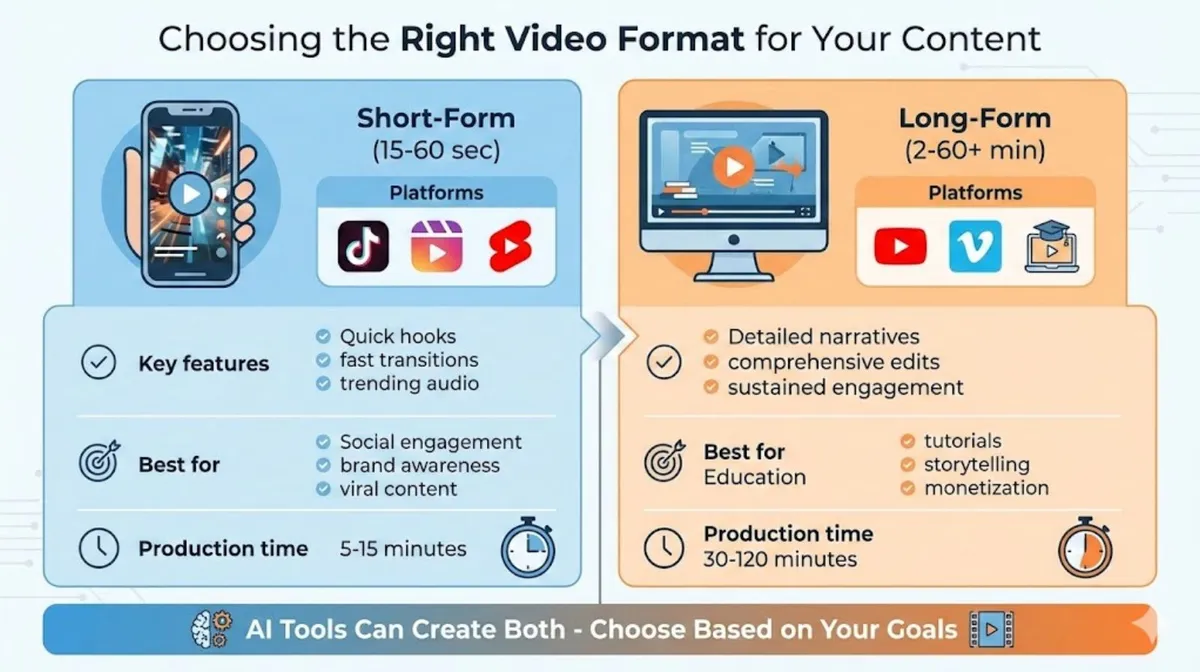
Different types of video material demand different features from AI video generators. Short-form visuals require punchy editing and trending effects, while long-form productions need narrative flow and detailed explanations.
Short-Form (15-60 seconds): Short videos need punchy visuals, quick transitions, trending music, mobile-optimized vertical formats, and attention-grabbing hooks. Platforms like TikTok, Instagram Reels, and YouTube Shorts thrive on fast-paced, engaging content that delivers value immediately. AI tools for short-form content prioritize speed, template variety, and social media optimization.
Long-Form (2-60+ minutes): Extended videos require narrative coherence, detailed explanations, varied pacing, professional editing, and sustained viewer engagement. YouTube tutorials, educational content, webinars, and documentaries fall into this category. AI generators for long-form content emphasize script-to-video conversion, AI presenters, comprehensive editing tools, and production quality.
Many modern AI video platforms excel at both formats. However, understanding these distinctions helps you leverage each tool's strengths effectively.
Why Creators Need AI Video Generators
The demand for video content has exploded across every platform. Creators face constant pressure to produce fresh, engaging videos regularly. AI video generators solve several critical challenges facing modern creators.
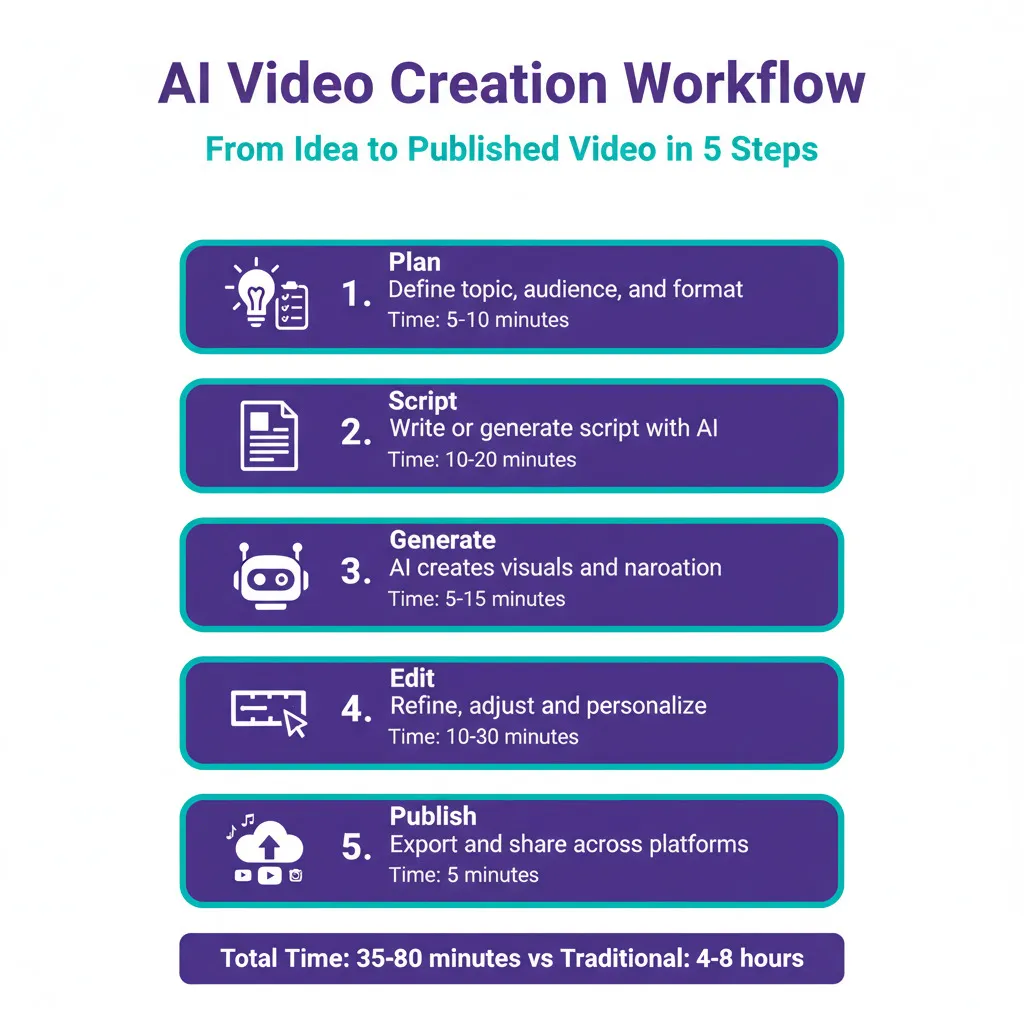
Time Efficiency: What once required hours of filming and editing now takes minutes. Generate complete videos from scripts while focusing on content quality rather than technical execution.
Cost Reduction: Professional video production traditionally costs thousands of dollars for equipment, software licenses, and potentially hiring videographers or editors. AI tools provide professional results at a fraction of traditional costs.
Consistency: Maintaining regular upload schedules becomes manageable when production time drops dramatically. AI tools enable consistent content output without burnout.
Accessibility: You don't need expensive cameras, studio lighting, or technical expertise. AI video generators democratize video creation, making it accessible to everyone regardless of background or budget.
Scalability: Creating content for multiple platforms with different format requirements becomes simple. Generate variations optimized for each platform from a single source.
Best AI Video Generators for Short-Form Content
1. Runway ML
Best For: Cinematic AI-generated video clips
Runway ML leads the industry in AI-powered video generation with cutting-edge features that produce stunning, cinematic results. The platform excels at creating unique video from text descriptions and offers powerful editing tools for refining footage.
Key Features for Short-Form: Text-to-video generation creates original footage from descriptions. Image-to-video animation brings static images to life smoothly. Motion tracking follows subjects automatically for dynamic shots. Green screen removal eliminates backgrounds instantly without manual work. Style transfer applies artistic filters and effects seamlessly.
Pricing Structure: Free tier includes 125 credits for experimentation. Standard plan costs $12 monthly with 625 credits. Pro plan offers $28 monthly with 2,250 credits. Unlimited plan provides $76 monthly for heavy users.
Perfect For: Creative TikTok videos with unique visuals, Instagram Reels requiring artistic effects, experimental content pushing creative boundaries, promotional clips needing cinematic quality, and brand demanding distinctive style.
Strengths: Runway produces genuinely unique footage impossible to capture with traditional cameras. The AI understands creative direction and generates content matching your artistic vision. Regular updates introduce new features keeping the platform cutting-edge.
Limitations: Credit system requires careful usage planning. Generation time varies based on complexity. Some features have learning curves for optimal results.
For comprehensive AI tool recommendations beyond video creation, explore our guide on Best Free AI Websites Everyone Should Try covering productivity and creative platforms.
2. InVideo AI
Best For: Quick social media video creation
InVideo AI specializes in rapid video production optimized for social media platforms. The tool excels at transforming scripts into polished videos with minimal effort, making it ideal for creators managing multiple social accounts.
Key Features for Short-Form: Script-to-video conversion transforms written content into complete videos automatically. Platform-specific templates optimize for TikTok, Reels, Shorts perfectly. Automatic subtitle generation ensures accessibility and engagement. Trending music library provides copyright-safe audio options. One-click resizing adapts content across different platforms effortlessly.
Pricing Structure: Free tier allows 10 minutes weekly with watermarks. Plus plan costs $20 monthly removing watermarks. Max plan offers $48 monthly with premium features and stock media access.
Perfect For: Social media managers juggling multiple accounts, influencers posting daily content consistently, small businesses creating promotional clips regularly, content repurposing from blogs to videos, and rapid content production for trending topics.
Strengths: InVideo's template library offers thousands of professionally designed options. The AI understands current social media trends and optimizes accordingly. Batch creation features allow producing multiple videos simultaneously.
Limitations: Free tier includes watermarks reducing professional appearance. Premium stock footage requires higher-tier subscriptions. Template-heavy approach may limit unique branding without customization.
3. Pictory
Best For: Converting blog posts into videos
Pictory transforms written content into engaging videos automatically, making it invaluable for bloggers and marketers. The platform analyzes text, identifies key points, and generates appropriate visual sequences seamlessly.
Key Features for Short-Form: Article-to-video conversion repurposes existing written content efficiently. AI scene selection matches visuals to content themes intelligently. Automatic voiceover generation adds professional narration instantly. Text highlight animations emphasize important points visually. Stock footage integration from millions of licensed clips ensures quality.
Pricing Structure: Standard plan costs $23 monthly for 30 videos. Premium plan offers $47 monthly with 60 videos and priority support. Teams plan provides custom pricing for collaborative environments.
Perfect For: Bloggers repurposing articles into video, marketers creating explainer videos from product descriptions, educators transforming lesson plans into visual content, and businesses producing training videos from documentation.
Strengths: Pictory excels at understanding written context and selecting appropriate visuals. The AI maintains narrative coherence throughout videos. Integration with stock libraries ensures high-quality footage availability.
Limitations: No free tier limits initial experimentation. Generic stock footage occasionally appears across multiple videos. Heavy reliance on stock media may not suit brands requiring original footage.
If you're creating supporting written content for your videos, check our detailed guide on Best AI Writing Tools for Fast and Easy Content Creation to streamline your entire workflow.
Best AI Video Generators for Long-Form
4. Synthesia
Best For: Professional AI presenter videos
Synthesia revolutionizes long-form video creation with realistic AI avatars that present your content professionally. The platform eliminates the need for cameras, studios, or on-screen talent while delivering polished, professional results.
Key Features for Long-Form: 150+ AI avatars provide diverse representation options. Custom avatar creation allows brand-specific presenters. 120+ languages and accents ensure global reach. Automatic subtitle generation in multiple languages increases accessibility. Screen recording integration combines presentations with narration seamlessly.
Pricing Structure: Starter plan costs $22 monthly for 10 minutes. Creator plan offers $67 monthly with 30 minutes and more avatars. Enterprise plans provide custom solutions for large organizations.
Perfect For: Corporate training videos maintaining consistent presentation quality, educational courses requiring professional instructors, product demonstrations needing clear explanations, internal communications for global teams, and onboarding videos with multilingual requirements.
Strengths: Synthesia's AI avatars look remarkably realistic and natural. The platform handles complex scripts maintaining engagement throughout. Time savings are enormous compared to traditional presenter videos.
Limitations: AI avatars may not suit all content types. Monthly minute limits require planning for heavy users. Customization options have learning curves for optimal results.
5. Descript
Best For: Podcast and interview video editing
Descript approaches video editing from a text-editing perspective, allowing you to edit videos by editing transcripts. This revolutionary approach dramatically speeds up long-form production, especially for podcasts and interviews.
Key Features for Long-Form: Text-based editing removes filler words by deleting text. AI voice cloning fixes mistakes without re-recording. Automatic transcription converts speech to editable text accurately. Multi-track editing handles complex podcast setups easily. Studio Sound enhancement improves audio quality dramatically.
Pricing Structure: Free tier includes 1 hour monthly transcription. Creator plan costs $12 monthly with 10 hours. Pro plan offers $24 monthly with 30 hours and advanced features.
Perfect For: Podcast video production with minimal editing time, interview content requiring substantial editing, webinar recordings needing polish and refinement, tutorial videos with speaking mistakes requiring fixes, and educational content with extensive narration.
Strengths: Descript's text-based editing feels intuitive for writers and non-editors. Removing filler words improves pacing without complex timeline editing. Overdub feature saves countless re-recording hours.
Limitations: Best suited for talking-head content rather than dynamic footage. Learning the text-editing paradigm requires mindset adjustment. Heavy video effects require traditional editing software.
6. HeyGen
Best For: Avatar-based explainer videos
HeyGen combines AI avatars with user-friendly interfaces for creating professional explainer videos quickly. The platform balances ease of use with powerful features ideal for educational and marketing creations.
Key Features for Long-Form: Customizable AI avatars represent your brand consistently. Template library provides professional starting points. Multi-scene support enables complex narratives. Voice cloning creates personalized narration. Video translation reaches global audiences effortlessly.
Pricing Structure: Free tier includes 1 video credit monthly. Creator plan costs $24 monthly with 15 credits. Business plan offers $72 monthly with 45 credits and premium features.
Perfect For: Marketing explainer videos communicating value propositions, educational content teaching complex concepts, sales presentations delivered consistently, customer onboarding reducing support workload, and training materials maintaining professional standards.
Strengths: HeyGen balances professional results with user-friendly interfaces. The avatar quality rivals higher-priced alternatives. Template variety accelerates production significantly.
Limitations: Credit system requires careful project planning. Avatar movements occasionally appear slightly robotic. Advanced customization demands higher-tier subscriptions.
Comparison and Selection Guide
Comprehensive Tool Comparison
Tool | Best Use Case | Starting Price | Free Tier | Short-Form | Long-Form | Key Strength |
|---|---|---|---|---|---|---|
Runway ML | Cinematic clips | $12/month | ✓ Limited | ✓✓✓ | ✓✓ | Creative generation |
InVideo AI | Social media | $20/month | ✓ Limited | ✓✓✓ | ✓✓ | Template variety |
Pictory | Blog to video | $23/month | ✗ | ✓✓ | ✓✓✓ | Content repurposing |
Synthesia | AI presenters | $22/month | ✗ | ✓ | ✓✓✓ | Professional avatars |
Descript | Podcast editing | $12/month | ✓ Good | ✓ | ✓✓✓ | Text-based editing |
HeyGen | Explainers | $24/month | ✓ Limited | ✓✓ | ✓✓✓ | Easy avatar videos |
Rating Key: ✓ = Basic support, ✓✓ = Good support, ✓✓✓ = Excellent support
Choosing Based on Your Content Strategy
For Social Media Creators: Focus on Runway ML for unique creative or InVideo AI for high-volume production. These tools optimize specifically for social platforms with appropriate aspect ratios, trending features, and rapid generation capabilities.
For Educational Video Creators: Synthesia or HeyGen provide professional presentation without requiring on-camera appearances. Both platforms handle complex scripts while maintaining viewer engagement through realistic AI avatars.
For Podcast and Interview Producers: Descript revolutionizes editing workflows by allowing text-based editing. Remove filler words, fix mistakes, and polish content without traditional timeline editing complexity.
For Marketing Teams: Pictory excels at repurposing existing written content into video format. Transform blog posts, case studies, and documentation into engaging video efficiently.
For Creative Experimenters: Runway ML pushes boundaries with cutting-edge AI generation capabilities. Create truly unique meterial impossible with traditional video production methods.
Maximizing Results from AI Video Generators
Writing Effective Video Scripts for AI
Quality output requires quality input, especially with AI video generators. Well-structured scripts produce significantly better results than vague descriptions or rough outlines.
Script Structure Best Practices:
Open with strong hooks capturing attention immediately within three seconds. State the value proposition clearly so viewers understand benefits quickly. Break complex topics into digestible segments maintaining engagement throughout. Include clear calls-to-action guiding viewer next steps. Close with memorable conclusions reinforcing key messages effectively.
Detailed Scene Descriptions:
Specify visual elements explicitly rather than assuming AI interpretation. Describe settings, actions, emotions, and specific shot requirements clearly. More detail generally produces better results matching your vision accurately.
Voice and Tone Guidelines:
AI narration works best with conversational, natural language rather than overly formal scripts. Write how people actually speak including contractions and casual phrases. Shorter sentences work better for AI voiceover pacing and clarity.
Optimizing Videos for Different Platforms
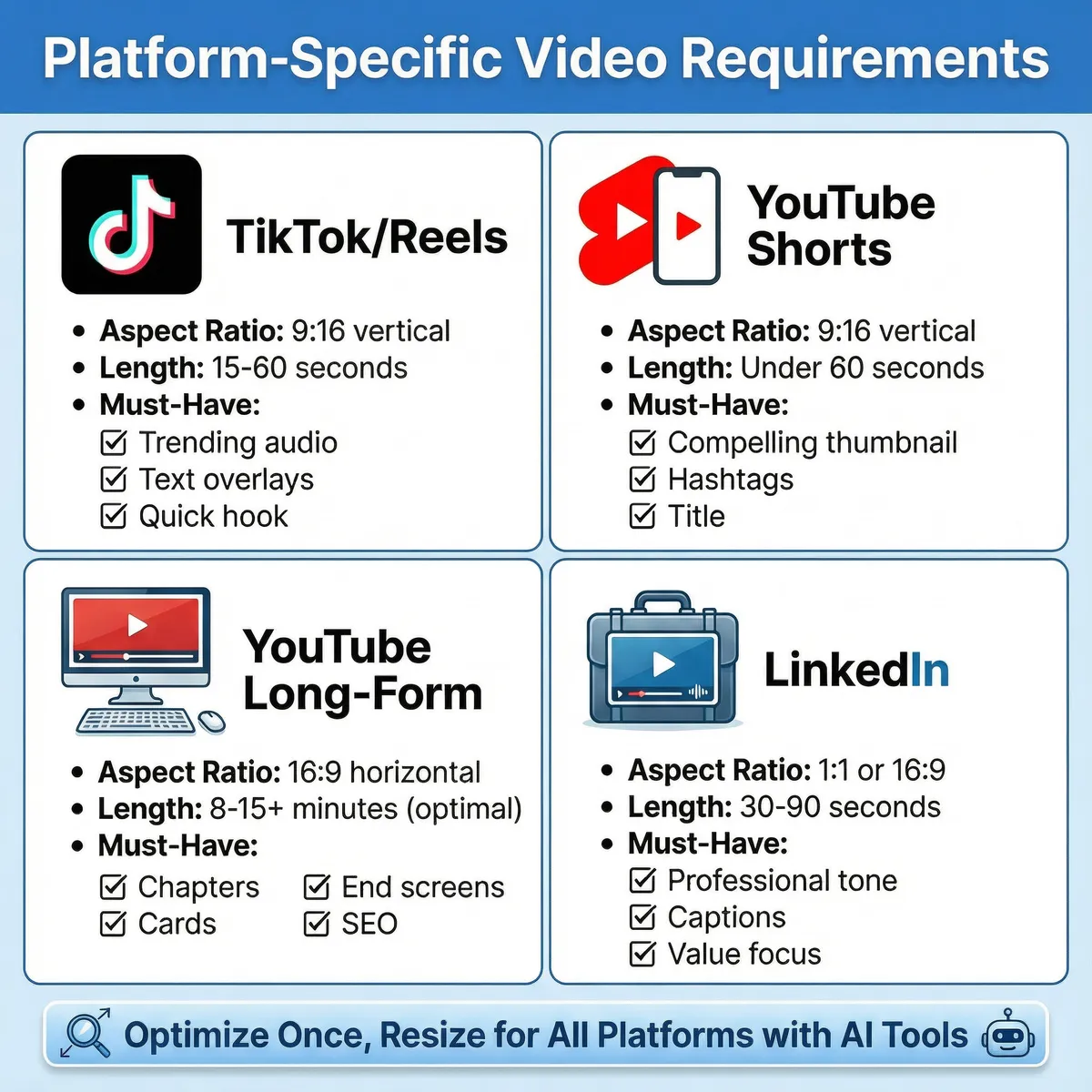
Each platform has unique requirements and audience expectations demanding specific optimization strategies for maximum engagement and reach.
TikTok and Instagram Reels (9:16 vertical): Videos should be 15-60 seconds maximum length. Use trending sounds whenever contextually appropriate. Include text overlays since many watch without sound. Start with immediate value or entertainment avoiding slow introductions.
YouTube Shorts (9:16 vertical): Keep videos under 60 seconds for optimal algorithm performance. Design eye-catching thumbnails even for shorts. Add descriptive titles and relevant hashtags for discoverability.
YouTube Long-Form (16:9 horizontal): Create compelling thumbnails and titles driving click-through rates. Structure videos with clear chapters improving user experience. Optimize descriptions with keywords enhancing search visibility. Include cards and end screens promoting related content.
LinkedIn (1:1 or 16:9): Maintain professional tone appropriate for business contexts. Add captions since autoplay occurs silently in feeds. Keep content value-focused addressing professional pain points and solutions.
For creating eye-catching thumbnails and supplementary graphics, explore our comprehensive guide on Best Image Creating AI Tools for Beginners (2026 Edition) to complete your video toolkit.
Advanced Techniques for Professional Results
Layering Multiple AI Tools:
Combine different AI platforms leveraging each tool's strengths for superior results. Generate scripts with ChatGPT, create videos with Pictory, add voiceovers through ElevenLabs, and edit final cuts in Descript. This multi-tool approach produces professional quality exceeding any single platform's capabilities.
Brand Consistency Maintenance:
Develop style guides specifying colors, fonts, logo placement, and tone consistently. Apply these standards across all AI-generated videos maintaining brand recognition. Custom avatars, consistent intros/outros, and signature elements strengthen brand identity.
Audience Engagement Optimization:
Analyze performance metrics identifying what resonates with your specific audience. Test different hooks, pacing, lengths, and styles systematically. AI tools enable rapid iteration making A/B testing practical and insightful.
Accessibility Considerations:
Always include captions improving accessibility for hearing-impaired viewers while boosting engagement. Many viewers watch silently in public spaces making captions essential. Use clear visuals supporting audio creating multi-sensory experiences.
Monetization and Business Applications
Using AI Video Generators for Revenue
Professional video opens multiple revenue streams for creators and businesses utilizing AI video generators strategically.
YouTube Ad Revenue:
Long-form monetizes through YouTube Partner Program after meeting requirements. AI video generators enable consistent content production meeting upload schedules. Educational, tutorials, and entertainment videos generate substantial ad revenue when published consistently.
Sponsored Content Creation:
Brands pay creators for product integrations and dedicated videos. AI tools enable faster production accepting more sponsorship opportunities. Professional-looking content commands higher rates from potential sponsors.
Course and Digital Product Sales:
Educational creators monetize expertise through courses and memberships. AI video generators reduce production time enabling rapid course creation. Professional presentation quality increases perceived value justifying premium pricing.
Client Services:
Offer video creation services to businesses lacking internal capabilities. AI tools enable competitive pricing while maintaining healthy profit margins. Service packages can include social media, promotional videos, training materials, and more.
Business Applications Beyond Content Creation
Internal Training and Onboarding:
Companies use AI video generators creating consistent training materials efficiently. Employee onboarding videos standardize information delivery reducing HR workload. Compliance training videos ensure consistent messaging across organizations.
Customer Education and Support:
Product tutorial videos reduce support ticket volume significantly. FAQ videos provide 24/7 self-service support options. Update videos keep customers informed about new features regularly.
Marketing and Sales Enablement:
Product demonstration videos convert prospects more effectively than text descriptions. Testimonial videos build trust and credibility with potential customers. Sales teams use personalized video messages improving outreach effectiveness.
Frequently Asked Questions
1. Can AI video generators replace professional videographers?
AI video generators excel at specific content types like explainer videos, social media, and educational materials where automation provides efficiency. However, professional videographers remain essential for content requiring artistic vision, complex cinematography, event coverage, or brand storytelling demanding human creativity and technical expertise. The most effective approach combines AI efficiency for appropriate content types with professional services for projects requiring human artistry.
2. Do AI-generated videos rank well on YouTube and social platforms?
Platform algorithms prioritize engagement metrics like watch time, likes, comments, and shares rather than production methods. AI-generated videos rank equally well as traditionally produced material when they provide value and engage audiences effectively. Quality content, compelling hooks, proper optimization, and audience resonance matter more than whether humans or AI created the video. Focus on delivering value regardless of production method.
3. What are the copyright implications of AI-generated video content?
Most reputable AI video platforms grant commercial usage rights to generated video. However, regulations vary by jurisdiction and continue evolving as technology advances. Always review specific platform terms of service regarding media ownership and usage rights. Additionally, ensure any stock footage, music, or images used within AI videos have appropriate licensing. When monetizing, verify you have necessary rights for all elements.
4. How much does it cost to produce videos using AI generators monthly?
Costs vary significantly based on volume and quality requirements. Budget options start around $12-20 monthly for basic plans suitable for occasional creators. Mid-tier plans ($24-48 monthly) serve regular content creators with moderate volume needs. Professional plans ($50-100+ monthly) support businesses and heavy users requiring unlimited access and premium features. Many creators start with free tiers experimenting before committing to paid subscriptions.
5. Can I create videos in multiple languages using AI generators?
Most modern AI video platforms support multiple languages for both narration and subtitles. Tools like Synthesia and HeyGen offer 100+ languages enabling global idea reach. Voice cloning technology allows maintaining consistent presenter voices across different languages. Translation features automatically adapt existing videos for international audiences without recreating content from scratch. This multilingual capability dramatically expands potential audience reach cost-effectively.
5 Common Mistakes When Using AI Video Generators
Mistake #1: Using Default Settings Without Customization
The Problem: Accepting AI-generated content with default settings produces generic videos indistinguishable from countless other creators using identical platforms. Audiences quickly recognize template-based content reducing engagement and brand recognition.
The Solution: Customize every element possible including colors, fonts, transitions, music, pacing, and visual style. Develop consistent brand guidelines applying them to all AI-generated videos. Invest time personalizing templates creating unique, recognizable content standing apart from competitors.
Why It Matters: Generic content gets ignored in crowded social feeds. Distinctive branding builds recognition, trust, and loyal audiences. Small customization efforts compound into significant differentiation over time.
Real-World Impact: Studies show branded, customized content receives 40-60% higher engagement than generic template videos. Viewers remember distinct visual styles creating lasting impressions and repeat viewership.
Mistake #2: Neglecting Script Quality and Storytelling
The Problem: Focusing entirely on AI capabilities while neglecting fundamental storytelling principles produces technically sound videos lacking substance or engagement. Poor scripts result in poor videos regardless of AI sophistication.
The Solution: Invest substantial effort crafting compelling scripts with clear narratives, strong hooks, and valuable content. Structure videos with beginning, middle, and end. Focus on solving viewer problems or entertaining audiences effectively. Remember AI amplifies script quality—good scripts become great videos while poor scripts remain poor videos.
Why It Matters: Content quality determines long-term success more than production efficiency. Audiences return for valuable, engaging content regardless of production method. Strong storytelling differentiates successful creators from abandoned channels.
Real-World Impact: Videos with well-structured narratives maintain 70-80% retention rates compared to 30-40% for poorly structured content. Viewer retention directly impacts algorithm recommendations and channel growth.
Mistake #3: Overusing Stock Footage and Generic Visuals
The Problem: Relying excessively on stock footage libraries results in videos feeling impersonal and generic. Viewers recognize frequently-used stock clips reducing credibility and engagement.
The Solution: Mix stock footage with custom elements including screen recordings, unique graphics, personal photos, or original AI-generated visuals. Use stock footage strategically for supporting B-roll rather than primary content. Platforms like Runway ML generate unique visuals impossible to replicate avoiding stock footage entirely.
Why It Matters: Authenticity builds audience connections more effectively than polished but generic content. Overused stock footage signals lack of effort reducing perceived content value.
Real-World Impact: Creators mixing custom and stock elements report 35-50% higher engagement than those using exclusively stock footage. Audiences appreciate authentic, unique content over formulaic production.
Mistake #4: Ignoring Platform-Specific Optimization
The Problem: Creating one video format attempting to repurpose it across all platforms without optimization. Each platform has unique requirements, audience expectations, and algorithm preferences that significantly impact performance.
The Solution: Optimize videos specifically for each platform considering aspect ratios, length requirements, thumbnail styles, and audience preferences. Create platform-specific versions rather than repurposing identical content everywhere. Invest time understanding each platform's best practices and algorithm preferences.
Why It Matters: Platform algorithms reward native content optimized for their specific requirements. Poorly formatted videos receive limited reach regardless of content quality. Optimization dramatically impacts visibility and engagement.
Real-World Impact: Properly optimized videos receive 3-5x more reach than poorly formatted repurposed content. Platform-specific optimization represents minimal effort for substantial performance improvements.
Mistake #5: Publishing Without Human Review and Editing
The Problem: Trusting AI-generated content completely and publishing without careful review. AI makes mistakes including factual errors, awkward phrasing, inappropriate visuals, or technical glitches requiring human oversight.
The Solution: Always review AI-generated videos completely before publishing. Check for factual accuracy, appropriate visual selections, smooth transitions, proper audio sync, and overall quality. Edit mistakes, improve pacing, and add personal touches elevating content above raw AI output.
Why It Matters: Published mistakes damage credibility and professionalism. Human review catches errors AI overlooks ensuring quality standards. The editing process adds personality and authenticity AI cannot replicate.
Real-World Impact: Creators reviewing and editing AI content report 60-80% fewer negative comments and higher audience trust metrics. Small quality improvements significantly impact long-term channel reputation and growth.
Conclusion: Embracing the AI Video Revolution
AI video generators have democratized video content creation in 2026, making professional-quality production accessible to everyone regardless of budget, technical skills, or resources. The barriers that once limited video creation to professionals with expensive equipment have completely disappeared.
Whether you're creating engaging short-form content for social media or comprehensive long-form videos for YouTube, AI tools provide powerful capabilities accelerating production while maintaining quality. The technology continues improving rapidly with new features, better quality, and lower costs appearing regularly.
Success with AI video generators requires balancing technological capabilities with fundamental content principles. Tools handle technical execution while you provide creative direction, storytelling expertise, and audience understanding. This collaboration between human creativity and artificial intelligence produces results exceeding either working independently.
Your Action Plan for Getting Started:
This Week: Choose one AI video generator matching your content goals and budget. Create your first test video experimenting with features. Review results identifying strengths and areas for improvement.
This Month: Establish consistent production workflows leveraging AI efficiency. Create several videos testing different approaches and analyzing performance. Refine processes based on audience response and engagement metrics.
This Quarter: Build systematic content strategies producing regular videos. Combine multiple AI tools optimizing each production stage. Develop distinctive style and branding differentiating your content effectively.
Essential Takeaways:
Start with clear content strategies before selecting tools. AI generators accelerate production but cannot replace thoughtful planning. Focus on storytelling quality with AI handling technical execution. Customize default outputs creating distinctive, memorable content. Review and edit all AI-generated content before publishing. Optimize specifically for each platform maximizing reach and engagement.
The future of video content creation combines human creativity with AI efficiency. These powerful tools enable anyone with valuable ideas to share them through engaging video content. Your audience awaits your unique perspective—AI video generators simply help you deliver it professionally and efficiently.
Start creating today and discover how AI video generators transform your content production capabilities. The revolution isn't coming—it's already here, and it's remarkably accessible.
For building complete content ecosystems combining video with written material, explore our comprehensive guides on Best AI Writing Tools for Fast and Easy Content Creation and Best Free AI Websites Everyone Should Try covering the entire content creation spectrum.
Frequently Asked Questions
Most reputable AI video platforms grant commercial usage rights to generated content. However, regulations vary by jurisdiction and continue evolving as technology advances.
Never Miss an Update
Join thousands of readers getting the latest insights on technology, business, and digital marketing.