Best AI Tools for Students to Save Time in Study
Transform your study routine with AI tools designed specifically for students. Learn faster, complete assignments efficiently, and achieve better grades.
Hasan Wazid

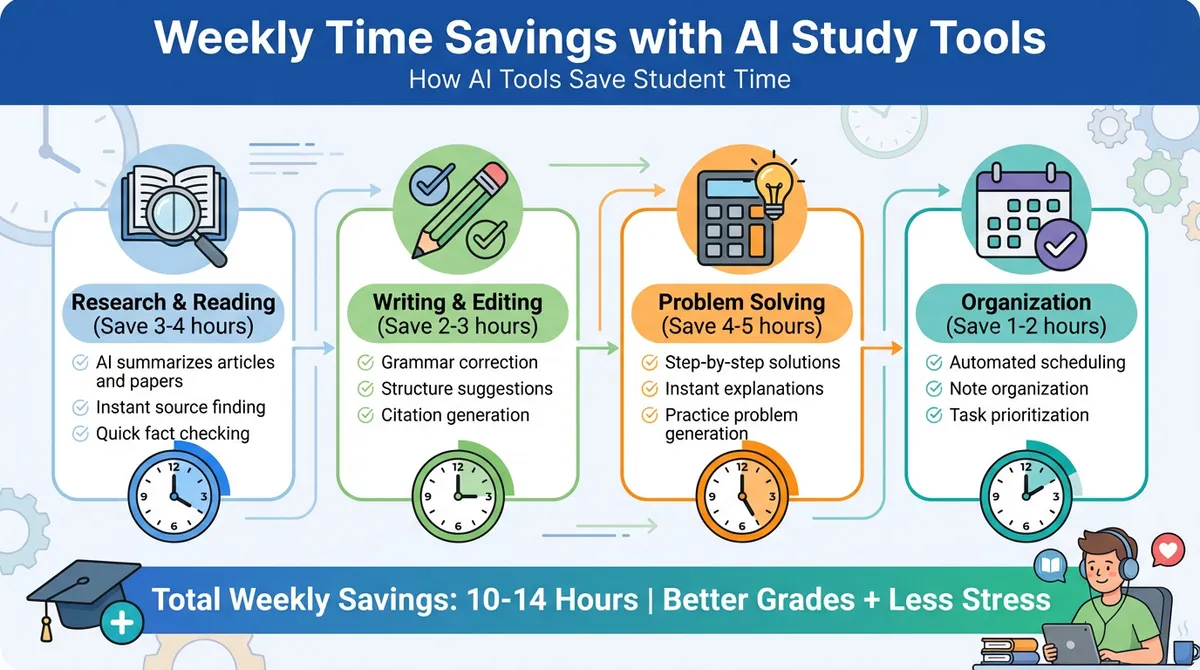
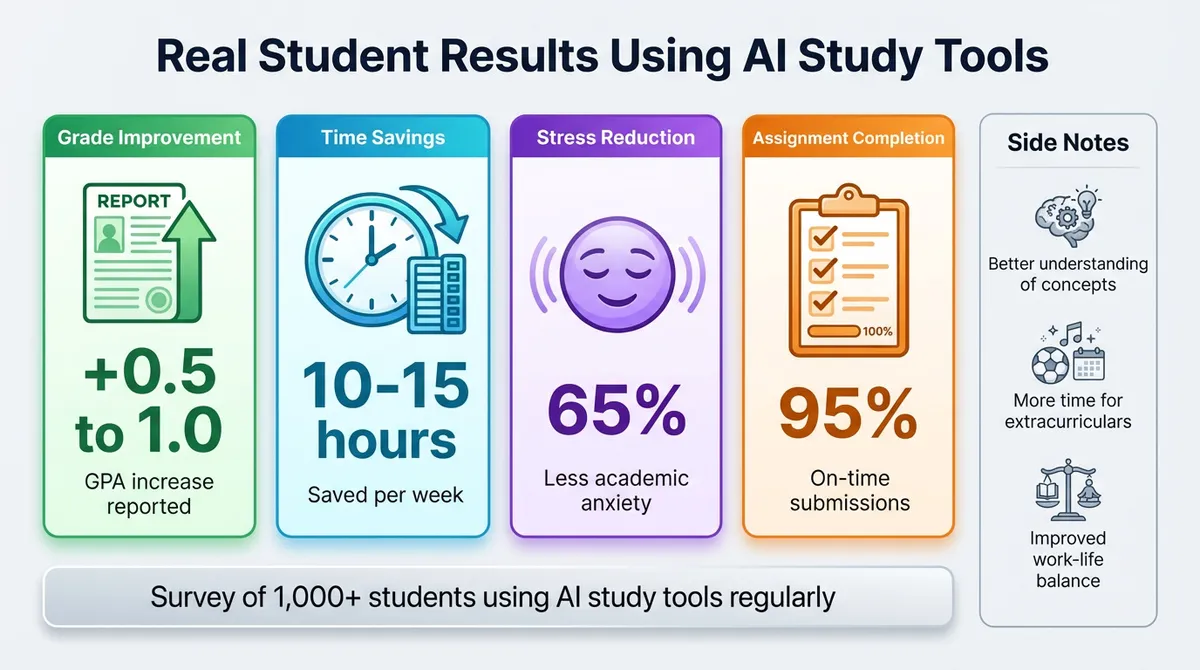
Modern students face overwhelming workloads balancing classes, assignments, projects, and personal life. AI tools specifically designed for academic success can save 10-15 hours weekly while improving learning outcomes. Top solutions include ChatGPT for explanations and homework help, Grammarly for essay writing, Quizlet AI for memorization, Notion AI for organization, and Mathway for solving complex problems.
Too long? Ask AI to summarize
Get a quick summary of this article using your favorite AI assistant
Introduction: How AI Transforms Modern Student Life
Students in 2026 navigate unprecedented academic demands with mounting assignments, complex subjects, tight deadlines, and increasing competition. Traditional study methods often consume excessive time while delivering suboptimal results. Countless hours spent on repetitive tasks, struggling through difficult concepts alone, and managing overwhelming schedules create unnecessary stress.
Artificial intelligence has emerged as the ultimate study companion for modern students. These intelligent tools don't replace learning—they accelerate it dramatically. Imagine having a personal tutor available 24/7, a writing assistant catching every grammar mistake, a research helper finding sources instantly, and an organization system keeping everything perfectly structured. This isn't fantasy—it's the reality AI tools provide today.
The transformation goes beyond mere convenience. AI tools for students enable deeper understanding through personalized explanations, immediate feedback on work, efficient time management, and focused studying on weak areas. Students using these tools report improved grades alongside reduced study hours, creating the ideal combination of better results with less stress.
This comprehensive guide explores the best AI tools specifically beneficial for students across all academic levels. We'll examine how each tool saves time, improves learning outcomes, and fits seamlessly into daily study routines. Whether you're struggling with math, writing essays, memorizing concepts, or staying organized, there's an AI solution designed for your specific challenges.
Understanding AI Tools for Academic Success
Why Students Need AI Study Assistants
Traditional education methods haven't kept pace with modern information demands. Textbooks provide static information while teachers manage large classes with limited individual attention. Students often struggle alone with difficult concepts, waste hours on inefficient study methods, and miss opportunities for personalized learning approaches.
AI tools bridge these gaps effectively by providing instant access to explanations whenever confusion arises. Personalized learning adapts to individual pace and style preferences automatically. Immediate feedback identifies mistakes before they become ingrained habits. Efficient study techniques maximize retention while minimizing time investment.
The Academic Time Crisis:
Average students spend 15-20 hours weekly on homework and studying. Much of this time involves inefficient methods like rereading textbooks, searching for resources, rewriting notes, and struggling through problems alone. AI tools can reduce this by 40-60% while actually improving comprehension and retention.
Learning Enhancement Benefits:
Beyond time savings, AI tools improve actual learning outcomes significantly. Adaptive explanations match your current understanding level. Multiple explanation methods cater to different learning styles. Spaced repetition optimizes long-term memory formation. Progress tracking identifies weak areas requiring attention.
How AI Tools Differ from Traditional Study Methods
Traditional approaches rely on static resources and delayed feedback loops. You read textbooks hoping to understand, complete assignments unsure if methods are correct, and wait days for teacher feedback. This slow cycle wastes time and allows misconceptions to persist.
AI tools provide dynamic, interactive learning experiences with instant feedback. Ask questions receiving immediate, personalized responses. Submit work getting instant assessment and improvement suggestions. Practice problems with real-time guidance and explanations. This accelerated feedback loop dramatically improves learning efficiency.
Key Differences:
Static textbooks versus interactive AI tutors responding to your specific questions. Generic study guides versus personalized learning paths adapting to your progress. Delayed teacher feedback versus instant AI assessment. One-size-fits-all approaches versus customized explanations matching your learning style.
Ethical Use of AI Tools in Education
Using AI tools responsibly maintains academic integrity while maximizing learning benefits. These tools should enhance understanding rather than bypass learning entirely. Think of AI as a tutor helping you learn concepts, not a service completing work for you.
Acceptable Uses:
Understanding difficult concepts through detailed explanations. Checking work for errors before submission. Organizing study materials and creating study schedules. Practicing problems with instant feedback. Generating study questions for self-assessment.
Unacceptable Uses:
Submitting AI-generated work as your own without understanding. Copying answers without learning underlying concepts. Using AI during exams without explicit permission. Avoiding actual learning by outsourcing everything to AI.
Balance Principle:
Use AI tools to learn more effectively, not to avoid learning altogether. The goal is mastering material efficiently, not just completing assignments quickly. AI should supplement your efforts, not replace them entirely.
Best AI Tools for Understanding and Learning
1. ChatGPT - Your 24/7 Study Tutor
Best For: Concept explanations and homework guidance
ChatGPT functions as an exceptionally patient tutor available anytime, anywhere. This conversational AI explains complex topics in simple terms, breaks down difficult problems into manageable steps, and adapts explanations to your understanding level.
Key Features for Students:
Unlimited question asking without judgment or impatience. Step-by-step problem solving teaches methods rather than just answers. Multiple explanation styles accommodate different learning preferences. Example generation helps understand concepts through practice. Concept connections show how topics relate to prior knowledge.
Study Applications:
Math problems receive detailed solution walkthroughs explaining each step. Science concepts get broken down with real-world examples and analogies. History topics are explained with context and connections. Language learning includes grammar explanations and practice sentences. Essay brainstorming generates ideas and structural suggestions.
Pricing and Access:
Free tier provides unlimited access to GPT-4o mini model. ChatGPT Plus costs $20 monthly offering GPT-4o with faster responses. Student plans may offer discounts through educational institutions.
Time Savings Estimate:
Students report saving 5-8 hours weekly by getting instant explanations instead of struggling alone. Understanding concepts faster means less repetition needed later.
Study Tips:
Ask for explanations like you're explaining to a younger sibling. Request multiple examples if the first explanation doesn't click. Follow up with "why" questions deepening conceptual understanding. Use it for brainstorming before starting major assignments.
Explore additional free AI resources in our comprehensive guide covering Best Free AI Websites Everyone Should Try for expanded learning support.
Khan Academy with Khanmigo
Best For: Structured learning with AI tutoring
Khan Academy's AI tutor Khanmigo combines comprehensive course content with personalized AI assistance. This platform provides structured learning paths while offering individualized support exactly when needed.
Key Features for Students:
Socratic questioning guides you toward answers rather than providing them directly. Progress tracking shows mastery levels across subjects. Practice exercises adapt difficulty based on performance. Video lessons supplement AI tutoring effectively. Safe, education-focused AI prevents misuse.
Study Applications:
Math subjects from basic arithmetic through calculus receive comprehensive coverage. Science topics include biology, chemistry, and physics with interactive content. SAT/ACT test prep includes practice tests and personalized study plans. Computer programming courses teach coding with AI assistance.
Pricing and Access:
Basic Khan Academy content remains completely free. Khanmigo AI tutoring requires subscription at affordable student rates. Financial aid available for qualifying students.
Time Savings Estimate:
Personalized learning paths eliminate studying topics already mastered. Students report 30-40% faster progress through subjects.
Study Tips:
Let Khanmigo guide your thinking rather than seeking direct answers. Complete practice exercises until achieving consistent mastery. Review AI feedback understanding why mistakes occurred. Use progress tracking identifying weak areas requiring focus.
3. Wolfram Alpha
Best For: Math, science, and data analysis
Wolfram Alpha functions as a computational knowledge engine solving complex math problems, providing scientific data, and performing advanced calculations instantly. This tool excels at subjects requiring precise calculations and data analysis.
Key Features for Students:
Step-by-step solutions show complete problem-solving processes. Scientific calculators handle complex equations effortlessly. Data analysis generates graphs and statistical insights. Chemistry calculations include molecular structures and equations. Physics problems receive detailed solutions with explanations.
Study Applications:
Algebra through calculus problems solved with complete walkthroughs. Chemistry equations balanced with molecular visualization. Physics calculations include units and conversion handling. Statistics problems receive detailed analysis and interpretation. Engineering calculations handled with precision and clarity.
Pricing and Access:
Basic computational access remains free with limitations. Pro version costs $7.25 monthly providing step-by-step solutions. Student pricing offers significant discounts.
Time Savings Estimate:
Checking work takes seconds instead of minutes. Understanding solution methods prevents repeating mistakes. Students save 3-5 hours weekly on math and science homework.
Study Tips:
Study the step-by-step solutions rather than just copying answers. Use it for checking work after attempting problems yourself. Explore related problems understanding broader concepts. Reference it during homework but work independently during exams.
Best AI Tools for Writing and Research
4. Grammarly - Writing Excellence Made Easy
Best For: Essay writing and grammar perfection
Grammarly serves as your personal writing coach identifying errors, suggesting improvements, and teaching better writing habits. This tool works everywhere you write ensuring consistent quality across assignments.
Key Features for Students:
Real-time grammar and spelling correction catches mistakes instantly. Clarity suggestions improve sentence structure and readability. Tone detection ensures appropriate academic writing style. Plagiarism checking prevents unintentional academic violations (Premium). Vocabulary enhancement suggests stronger word choices.
Study Applications:
Essay drafting receives immediate feedback during writing process. Email communication maintains professional tone with professors. Research papers get polished to publication quality. Scholarship applications present your best writing. Cover letters and resumes impress potential employers.
Pricing and Access:
Free version covers essential grammar and spelling. Premium costs $12 monthly adding plagiarism detection and advanced suggestions. Student discounts reduce costs significantly.
Time Savings Estimate:
Eliminating multiple revision rounds saves 2-3 hours per assignment. Writing confidently from the start reduces hesitation time. Students complete writing assignments 40% faster.
Study Tips:
Write freely first, then review Grammarly suggestions afterward. Learn from repeated mistake patterns improving overall writing. Use tone suggestions matching assignment requirements. Enable plagiarism checker before submitting important papers.
5. Elicit - Academic Research Assistant
Best For: Finding and analyzing research papers
Elicit specializes in academic research helping students find relevant papers, extract key information, and synthesize findings. This tool transforms research from tedious searching into efficient discovery.
Key Features for Students:
Semantic paper search finds relevant research beyond keyword matching. Key findings extraction summarizes papers quickly. Citation extraction pulls references for your bibliography. Question answering from papers provides specific information. Research synthesis combines findings from multiple sources.
Study Applications:
Literature reviews require less time finding quality sources. Research papers build on existing work efficiently. Essay arguments gain scholarly support quickly. Science projects reference current research easily. Thesis development benefits from comprehensive literature coverage.
Pricing and Access:
Free tier includes 5,000 monthly credits for basic research. Pro version costs $10 monthly with expanded capabilities. Academic pricing available for verified students.
Time Savings Estimate:
Finding relevant papers takes minutes instead of hours. Reading efficiency improves by focusing on key findings. Students save 4-6 hours on research-heavy assignments.
Study Tips:
Start with broad questions then narrow based on findings. Export citations directly into bibliography managers. Read AI summaries then full papers for key sources. Use comparative analysis features understanding different perspectives.
For complementary writing assistance beyond research, check our guide on Best AI Writing Tools for Fast and Easy Content Creation covering content generation platforms.
6. QuillBot - Paraphrasing and Summarization
Best For: Rewriting and understanding complex texts
QuillBot helps students understand difficult readings by paraphrasing complex language, summarize lengthy materials efficiently, and rewrite their own work avoiding repetition.
Key Features for Students:
Paraphrasing tool rewrites text maintaining original meaning. Summarization condenses long articles or chapters. Grammar checker ensures error-free writing. Citation generator creates proper references. Multiple writing modes adapt output style.
Study Applications:
Textbook chapters summarized for efficient review. Complex readings paraphrased into understandable language. Your own writing refined avoiding repetitive phrasing. Research notes rewritten in your own words. Study guides created from lecture notes and readings.
Pricing and Access:
Free tier allows 125 words per paraphrase. Premium costs $8.33 monthly (annual plan) removing limits. Student discounts available with valid ID.
Time Savings Estimate:
Reading comprehension improves reducing rereading needs. Note-taking becomes more efficient and organized. Students save 2-3 hours weekly on reading assignments.
Study Tips:
Paraphrase difficult passages understanding them better through rephrasing. Summarize chapters creating concise study guides. Use grammar checker before submitting all assignments. Rewrite your drafts achieving better flow and variety.
Best AI Tools for Memorization and Test Prep
7. Quizlet with AI Features
Best For: Flashcards and active memorization
Quizlet revolutionizes memorization through AI-powered flashcards, study games, and adaptive learning. This platform makes memorizing vocabulary, concepts, and facts engaging rather than tedious.
Key Features for Students:
AI-generated flashcards create study materials from your notes. Spaced repetition optimizes review timing for memory retention. Multiple study modes keep learning engaging and effective. Progress tracking shows mastery levels across topics. Test mode simulates exam conditions building confidence.
Study Applications:
Vocabulary memorization for language classes becomes game-like. Historical dates and events stick through repeated practice. Scientific terms and definitions get memorized efficiently. Math formulas and concepts are retained long-term. Test preparation covers all material systematically.
Pricing and Access:
Free tier includes basic flashcard creation and study. Quizlet Plus costs $7.99 monthly adding AI features and offline access. Student discounts reduce subscription costs.
Time Savings Estimate:
Efficient memorization methods reduce study time by 50%. Spaced repetition prevents cramming before exams. Students master material in 3-4 hours versus 6-8 hours traditional methods.
Study Tips:
Create flashcards immediately after learning new concepts. Study in short 15-20 minute sessions multiple times daily. Use learn mode until achieving 100% mastery. Review regularly preventing forgetting between study sessions.
8. Anki with AI Enhancements
Best For: Advanced spaced repetition learning
Anki provides powerful spaced repetition software that optimizes long-term memory formation. While having a steeper learning curve than Quizlet, it offers superior customization and effectiveness for serious students.
Key Features for Students:
Algorithm-optimized review schedules maximize retention efficiency. Customizable card templates accommodate any subject. Multimedia support includes images, audio, and video. Syncing across devices enables studying anywhere. Community-shared decks provide ready-made content.
Study Applications:
Medical and law students memorize vast amounts efficiently. Language learners build vocabulary systematically. STEM students retain complex formulas and concepts. Standardized test prep covers all required material. Professional exam preparation ensures certification success.
Pricing and Access:
Desktop and Android versions are completely free. iOS app costs one-time $24.99 purchase. No subscription fees required ever.
Time Savings Estimate:
Retention rates improve 70-80% versus traditional methods. Long-term memory formation eliminates constant review needs. Students invest less total time achieving better recall.
Study Tips:
Start with pre-made decks for common subjects. Create your own cards for maximum retention. Study daily maintaining consistency. Don't modify algorithm settings until understanding the system.
Best AI Tools for Organization and Productivity
9. Notion AI - All-in-One Student Workspace
Best For: Note organization and project management
Notion combines note-taking, task management, and collaboration in one platform. With AI features integrated throughout, it becomes the ultimate student organization system.
Key Features for Students:
AI writing assistance helps draft essays and summaries. Database organization structures notes and assignments systematically. Task management tracks deadlines and priorities automatically. Collaboration features enable group project coordination. Template library provides ready-made organizational systems.
Study Applications:
Class notes organized by subject and date. Assignment tracker shows all upcoming deadlines. Study schedules optimize time allocation. Group projects coordinate with shared workspaces. Research organization collects sources and findings.
Pricing and Access:
Personal plan is free for individual students. Plus plan costs $10 monthly adding unlimited AI. Education plan offers free features for verified students.
Time Savings Estimate:
Organization reduces time wasted searching for information. Clear priorities prevent deadline surprises. Students save 1-2 hours weekly through better organization.
Study Tips:
Create a template system for consistent note-taking. Use databases tracking all assignments across classes. Set up weekly review pages for exam preparation. Link related notes creating knowledge networks.
10. Motion - AI Calendar and Task Planner
Best For: Automatic schedule optimization
Motion uses AI automatically scheduling your study time, assignments, and activities. This intelligent calendar ensures everything gets done without overwhelming your schedule.
Key Features for Students:
Automatic task scheduling fits everything into available time. Priority assessment determines what needs attention first. Deadline tracking prevents last-minute cramming. Time blocking protects focus time from distractions. Calendar optimization balances work and breaks.
Study Applications:
Study schedules adjust automatically around class times. Assignment deadlines trigger timely work sessions. Exam preparation spreads review across multiple days. Break scheduling prevents burnout. Social activities fit around academic priorities.
Pricing and Access:
Individual plan costs $34 monthly. Student discounts reduce pricing significantly. Free trial available testing the system.
Time Savings Estimate:
Automated scheduling eliminates planning time. Optimized calendars prevent wasted time. Students gain 3-4 productive hours weekly.
Study Tips:
Input all assignments immediately when assigned. Set realistic time estimates for tasks. Allow AI to schedule breaks preventing burnout. Review weekly plans making necessary adjustments.
11. Otter.ai - Lecture Transcription
Best For: Recording and transcribing lectures
Otter.ai records lectures automatically transcribing everything spoken. This ensures you never miss important information while allowing full attention to understanding concepts.
Key Features for Students:
Real-time transcription creates searchable notes. Speaker identification distinguishes professor from students. Key point highlighting marks important information. Summary generation extracts main concepts. Recording sync preserves audio with transcript.
Study Applications:
Lecture capture ensures complete notes every class. Review becomes efficient searching specific topics. Group study references exact professor explanations. Absent classmates get complete lecture content. Exam review focuses on key points highlighted.
Pricing and Access:
Free tier includes 300 minutes monthly. Pro plan costs $10 monthly with 1,200 minutes. Student discounts available with verification.
Time Savings Estimate:
Active note-taking time reduces significantly. Review efficiency improves with searchable transcripts. Students save 2-3 hours weekly on note-taking and review.
Study Tips:
Always ask professor permission before recording. Supplement AI notes with your own key insights. Review transcripts same day while fresh. Search transcripts finding specific information quickly.
Practical Study Strategies with AI Tools
Creating Your Personal AI Study System
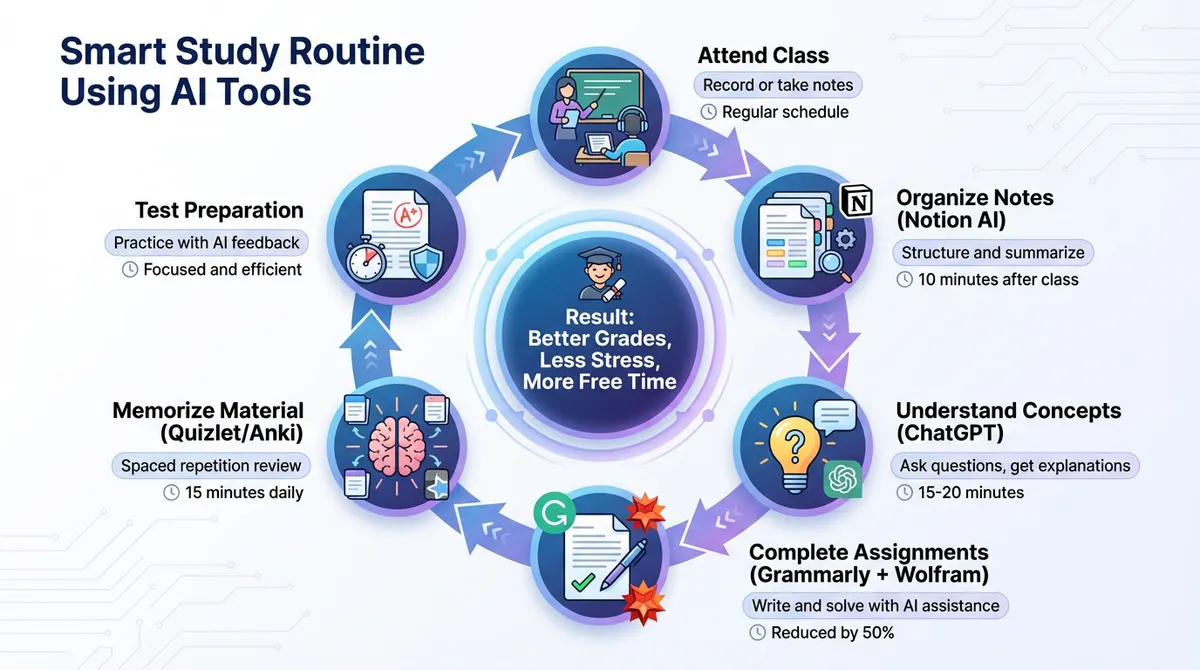
Success requires strategic integration of multiple tools creating a cohesive workflow. Random tool adoption produces inconsistent results while systematic approaches maximize benefits.
Morning Routine:
Check Motion calendar reviewing daily priorities and schedule. Review Anki flashcards during breakfast or commute. Read overnight Notion notifications about upcoming deadlines.
During Classes:
Record lectures with Otter.ai maintaining focus on understanding. Take supplementary notes highlighting confusing concepts. Note questions for later ChatGPT exploration.
Study Sessions:
Transfer Otter transcripts into organized Notion pages. Use ChatGPT explaining confusing lecture concepts. Complete assignments with Grammarly and Wolfram Alpha assistance. Create Quizlet sets for memorization needs.
Evening Review:
Update Notion task lists checking off completed items. Add new flashcards to Quizlet or Anki. Schedule tomorrow's priorities in Motion. Quick review of Anki cards before bed.
Subject-Specific AI Tool Combinations
Different subjects benefit from different tool combinations optimizing your approach for each class.
STEM Subjects (Math, Science, Engineering):
Primary tools include Wolfram Alpha for problem-solving, ChatGPT for concept explanations, Anki for formula memorization, and Notion for organizing problem sets. This combination handles calculations while building conceptual understanding.
Humanities (History, Literature, Philosophy):
Focus on ChatGPT for discussion questions, Grammarly for essay writing, Elicit for research, and Quizlet for key terms. These tools support reading comprehension and analytical writing.
Language Learning:
Combine ChatGPT for conversation practice, Quizlet for vocabulary building, Grammarly for writing correction, and Anki for long-term retention. Multiple practice modes accelerate fluency development.
Business and Social Sciences:
Use Elicit for research, ChatGPT for case analysis, Grammarly for reports, and Notion for project management. This suite handles research-heavy assignments efficiently.
Exam Preparation Strategies
AI tools excel at systematic exam preparation preventing last-minute cramming while ensuring comprehensive coverage.
Two Weeks Before:
Create comprehensive Quizlet or Anki sets covering all testable material. Organize Notion review pages by topic. Schedule daily Motion study blocks leading to exam.
One Week Before:
Daily spaced repetition sessions using flashcard apps. ChatGPT practice explaining concepts teaching to solidify understanding. Review Otter transcripts of all relevant lectures. Complete practice problems using Wolfram Alpha.
Final Days:
Focus on weak areas identified through practice. Use Quizlet test mode simulating exam conditions. ChatGPT generates practice questions testing knowledge. Motion schedules include mandatory breaks preventing burnout.
Exam Day:
Quick review of key concepts without cramming. Trust your systematic preparation. Arrive early feeling confident and prepared.
Frequently Asked Questions
1. Are AI tools considered cheating in academic settings?
Using AI tools appropriately for learning assistance is not cheating and is actually encouraged by progressive educational institutions. The distinction lies in using AI to understand concepts versus having AI complete work you claim as your own. Tools helping you learn, check your work, organize information, and understand difficult concepts are educational aids similar to tutors or study groups. However, submitting AI-generated work without understanding or attribution violates academic integrity. Always follow your institution's specific AI usage policies.
2. How much do AI study tools typically cost students monthly?
Costs vary significantly based on needs. Many essential tools offer robust free tiers sufficient for most students including ChatGPT, Khan Academy, Quizlet basic, and Notion. Budget-conscious students can operate effectively spending $0-10 monthly. Mid-range setups combining several premium features cost $20-40 monthly. Comprehensive access to all premium features runs $50-80 monthly. Many platforms offer student discounts significantly reducing these costs. Start with free options, then upgrade specific tools delivering maximum value.
3. Can AI tools actually improve grades or just save time?
Research consistently shows AI study tools improve both efficiency and outcomes simultaneously. Students using AI tools report average GPA increases of 0.5-1.0 points alongside reduced study time. This dual benefit occurs because AI enables better learning methods rather than just faster work completion. Immediate feedback corrects mistakes before they become habits. Personalized explanations match individual learning styles. Spaced repetition optimizes memory formation. Better organization prevents missed assignments. The combination produces better understanding with less wasted effort.
4. What happens if AI tools give incorrect information?
AI tools occasionally provide inaccurate information requiring critical thinking and verification. Never blindly trust AI outputs, especially for important assignments or exams. Cross-reference critical information with textbooks, reliable sources, or professors. Use AI for understanding concepts then verify through traditional authoritative sources. Develop habits of questioning and verifying rather than accepting everything uncritically. This approach builds both knowledge and critical thinking skills while using AI safely and effectively.
5. How can students with limited budgets access AI tools?
Numerous strategies provide AI tool access despite financial constraints. Start with completely free tools like ChatGPT, Khan Academy, Anki, and Quizlet basic tiers. Apply for student discounts universally offered by platforms like Grammarly, Notion, and others requiring valid student emails. Utilize institutional licenses—many universities provide free access to premium tools through educational agreements. Share family plans with friends splitting costs. Prioritize one or two premium tools delivering maximum personal value rather than subscribing to everything. Free versions of quality tools often suffice for academic success.
Conclusion: Studying Smarter in the AI Era
AI tools have fundamentally transformed how students learn, study, and succeed academically. These intelligent assistants provide capabilities previously unavailable to students including instant tutoring, personalized learning paths, efficient organization systems, and optimized memory formation. The result is better grades achieved with less stress and more free time for other important activities.
Success requires thoughtful AI tool integration rather than random adoption. Understanding your specific needs guides appropriate tool selection. Developing systematic workflows maximizes efficiency benefits. Maintaining ethical usage standards preserves academic integrity. Balancing AI assistance with genuine learning ensures both immediate success and long-term knowledge retention.
Frequently Asked Questions
Many essential tools offer robust free tiers sufficient for most students including ChatGPT, Khan Academy, Quizlet basic, and Notion.
Never Miss an Update
Join thousands of readers getting the latest insights on technology, business, and digital marketing.