AI Agents for Business: Practical Use Cases in 2025
AI agents for business are moving from pilots to production. Learn what they are, where they help most, and how to deploy and govern them safely in 2026.
Minhaj Sadik

In 2026, AI agents for business are no longer a side project for most companies. Tools powered by large language models now sit inside support desks, CRMs, and internal portals instead of living in isolated experiments. ...
Too long? Ask AI to summarize
Get a quick summary of this article using your favorite AI assistant
Introduction & Key Takeaways
Why AI Agents Matter for Businesses in 2026
In 2026, AI agents for business are no longer a side project for most companies. Tools powered by large language models now sit inside support desks, CRMs, and internal portals instead of living in isolated experiments. Leaders have shifted from asking “Should we try AI?” to “How can we use these agents in a way that is safe and genuinely useful?”
Many teams already experimented with chatbots or basic automation scripts. Those systems could answer simple questions or move data from one screen to another, but they usually stopped at a single step. Today, AI agents for business promise something more: software that can plan tasks, call tools, and push work across multiple systems with far less human intervention.
That promise creates pressure on you as a manager, founder, or team lead. Stakeholders want the benefits of automation, but they also want accountability and control. This guide gives you a practical view of AI agents, the best early use cases, and a realistic way to launch them without creating chaos.
The Direct Answer
AI agents for business are software systems that use AI models, memory, and tool access to plan and complete multi-step tasks on behalf of people or teams. Instead of just answering a single prompt, they keep track of a goal, decide which actions to take next, and interact with your existing tools and data.
In most organizations, the best starting points are customer service, IT operations, sales support, and back-office workflows where tasks are repetitive but still need context. To implement them safely, you pick one narrow workflow, define exactly what the agent is allowed to do, and run a supervised pilot with humans reviewing its work. When the results look stable, you extend its autonomy step by step and gradually build a portfolio of agents tied to specific business metrics such as handle time or backlog size.
Comprehensive Analysis
What Are AI Agents for Business and Why Are They Important?
How AI agents differ from chatbots and traditional automation
An AI agent is more than a chatbot that writes nice sentences. A chatbot usually responds to one question at a time, often without real memory of previous context. An AI agent instead holds a goal in mind, chooses actions over several steps, and can call tools or update systems as it works.
Traditional automation, such as RPA, follows brittle rules. When a screen changes or a field moves, the script often fails and needs manual updates. An AI agent relies on models that can interpret text and semi-structured data, so it can handle more variation in inputs. That does not mean it is magical, but it does make the agent better suited for processes with messy tickets, emails, or notes.
In practical terms, business AI agents normally have four traits. They have autonomy within clear limits, so they can pick the next action without asking a human every time. They maintain memory of the case or user. They can call tools and APIs to retrieve or change data. Finally, they collaborate with people by handing off edge cases, asking for approval, or logging a clear explanation of what they did.
Why agent-style AI is gaining traction in 2026
Several forces push companies toward agent-style systems. First, many organizations already tried “single-shot” AI, such as content drafting or basic chatbots, and now want deeper workflow impact. Second, customer expectations keep rising, and teams are exhausted by repetitive tasks. Third, vendors are packaging agent frameworks directly into CRMs, service desks, and data platforms, which lowers the barrier to experimentation.
Executives see forecasts about service cost reduction, shorter resolution times, and improved employee satisfaction. That creates urgency but also risk of over-promising. Your advantage comes from ignoring the hype and focusing on where agents actually help: repeatable processes with clear success criteria and moderate complexity.
Where AI agents sit in your tech stack
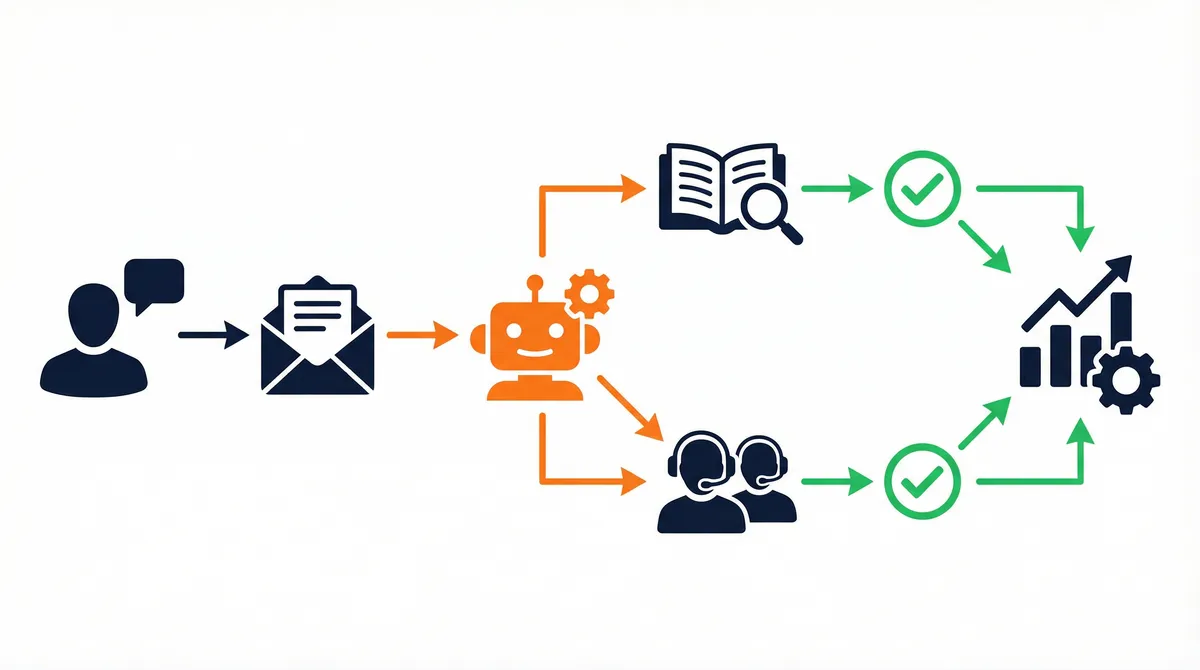
Inside your stack, AI agents typically act as an orchestration layer. They do not replace your CRM, ticketing system, or data warehouse. Instead, they sit between channels and systems, receiving events like customer messages or alerts, then calling tools in sequence to move the work forward.
A support agent might read an email, check entitlements in the CRM, search the knowledge base, draft a reply, and log the interaction. An IT agent might listen for alerts, correlate logs, open a ticket, and propose a remediation script. The value comes from that cross-system coordination, not from the text generation alone.
blog-monetization — monetizing traffic from AI-focused content
Step-by-Step: How to Start with AI Agents in Your Business
Step 1: Choose one narrow, valuable workflow
Start with a single workflow, not a vague ambition to “use agents everywhere.” Good early candidates are high-volume, somewhat repetitive, and low to medium risk. Examples include password resets, order status questions, basic billing inquiries, internal IT helpdesk tickets, and routine reporting tasks.
Talk to frontline staff and ask which tasks feel like “groundhog day.” Compare their answers with your metrics so you can see where wait times or backlogs are largest. When you pick a workflow that both data and people agree needs help, you reduce resistance and get better feedback later.
Step 2: Map the process in everyday language
Before opening any AI tool, sketch the workflow step by step. Start with the trigger, such as “customer sends a shipping complaint” or “monitoring system raises an alert.” List each action a human currently takes and which tools they open. Include decisions such as when to refund, escalate, or close.
Document common edge cases and exceptions. If VIP customers or specific product lines need special treatment, mark those as out of scope for the first version. That way, your initial agent focuses on the majority of straightforward cases, where it can make an immediate impact without touching sensitive scenarios.
Step 3: Select a platform and integration approach
Next, decide where the agent will run. You might use features built into your CRM or service desk, adopt a dedicated agent platform, or build on top of your existing AI infrastructure. The best choice depends on your current stack and team skills.
When comparing options, ask practical questions. How does it handle authentication and permissions? How are actions logged? How easy is it to connect to the tools you already rely on? A platform that supports human-in-the-loop review and clear policy controls will usually serve you better than one that only focuses on model quality.
Step 4: Write a “job description” for the agent
Treat your agent like a new employee. Write a plain-language job description that explains its goal, allowed actions, tools, and boundaries. For example, a customer service agent might resolve level-one shipping and billing questions using the CRM and knowledge base, approve refunds up to a set amount, and escalate anything that touches legal risk or high-value customers.
Spell out specific escalation triggers. These might include low confidence in its understanding of the request, conflicting data between systems, or language that suggests the customer is very upset. Also decide how the agent will document its decisions in tickets or logs so that audit and coaching remain easy.
Step 5: Run a supervised pilot with humans in the loop
Your first rollout should run in supervised mode. The agent performs the full workflow on real cases, but a human reviews draft outputs before anything goes to a customer or production system. That human can approve, correct, or reject each suggestion.
During this stage, track metrics such as accuracy, time saved, escalation rates, and customer sentiment. Also capture qualitative feedback from the people reviewing the agent’s work. Their comments show where the system shines and where changes to prompts, tools, or policies are needed.
Step 6: Add monitoring, guardrails, and ownership
Before you remove supervision for simple cases, put monitoring and governance in place. Define key metrics, set thresholds that trigger alerts, and decide how to pause or roll back behavior if needed. Strong logging of inputs, actions, and outputs helps you investigate any issues.
Assign clear owners on both the business and technical sides. Someone should be responsible for the outcomes the agent affects, and someone else should own reliability and maintenance. Regular reviews, even monthly, keep the system aligned with new policies, products, or regulations.
Step 7: Scale from one agent to a portfolio
Once a single workflow is stable and valuable, you can copy the pattern to other areas. Apply the same steps—use case selection, mapping, job design, pilot, and governance—to domains like finance, HR, and supply chain. Over time, your organization shifts from “one AI pilot” to a portfolio of targeted agents, each linked to specific metrics.
As you add agents, look for reusable components: shared tools, standard prompts, and common monitoring dashboards. A small central group can maintain these shared pieces, while business units handle domain-specific tuning. This balance lets you grow faster without losing control.
Expert Insights
Pros, Cons, and Comparison
AI agents can create impressive results in the right context, but they introduce new types of risk. Understanding both sides helps you make decisions that hold up over time rather than chasing short-term excitement.
Advantages
✅ Higher productivity on complex workflows: Agents help staff move through multi-step tasks faster by handling routine checks and updates in the background.
✅ Better use of your existing tools: Instead of adding yet another app, agents tie together the systems you already pay for, increasing the value you get from current licenses.
✅ Improved consistency: When designed well, agents apply the same rules every time, which reduces variance between individual employees on routine cases.
✅ Employee relief: Teams can hand repetitive, low-judgment work to agents and spend more time on tricky problems and relationship-building.
✅ 24/7 coverage for simple issues: Basic requests can be handled overnight or during peak spikes without adding headcount.
Disadvantages
❌ Implementation complexity: Designing good workflows, policies, and integrations takes more effort than plugging in a basic chatbot.
❌ Governance and risk: Without monitoring, agents can make quiet mistakes at scale, especially if their permissions are too broad.
❌ Skill gaps: Many organizations lack people who understand both business processes and AI systems well enough to lead these projects.
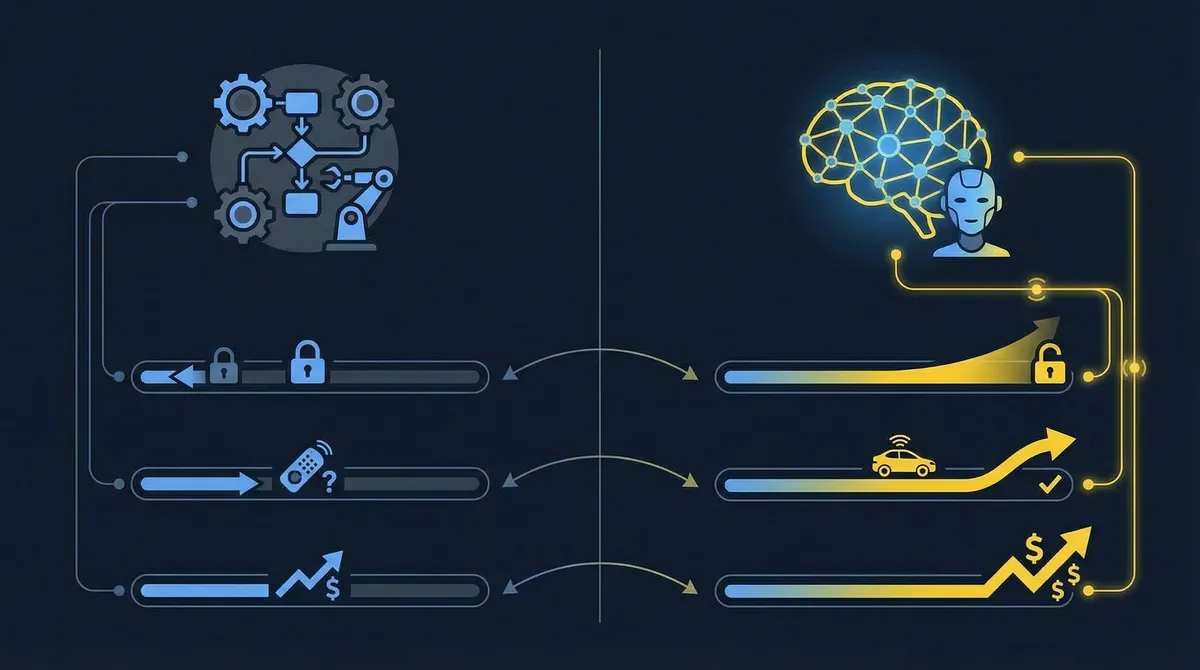
Comparison Table: AI Agents vs Traditional Automation
Feature | Traditional Automation (RPA, scripts) | AI Agents for Business |
|---|---|---|
Input flexibility | Low; needs clean, structured inputs | Handles messy text and mixed data |
Decision-making | Hard-coded rules | Model-based, guided by policies |
Maintenance | Frequent rule updates | Prompt, policy, or tool changes |
Typical use cases | Simple, stable tasks | Multi-step, context-heavy workflows |
Collaboration | Minimal human interaction | Designed to hand off and request approval |
Common Mistakes to Avoid
Mistake #1: Choosing the riskiest process first
❌ What people do wrong: Some teams pick their most sensitive process—such as credit decisions or clinical actions—as the very first target. That choice triggers heavy resistance from risk, legal, and compliance teams and often stalls progress for months.
✅ What to do instead: Begin with meaningful but moderate-risk workflows. Internal IT, simple customer questions, or routine back-office tasks are better proving grounds. When you show that agents can be safe and useful there, regulators and executives become more open to trying them in higher-stakes areas.
Mistake #2: Bolting agents onto messy workflows
❌ What people do wrong: Teams sometimes drop agents into workflows that are already confusing, with unclear ownership and redundant steps. In that situation, the agent feels like another layer of complexity rather than a helpful colleague.
✅ What to do instead: Clean up the process before or as you introduce an agent. Remove outdated steps, clarify responsibilities, and define what “done” means. A streamlined workflow makes it easier for the agent to behave predictably and makes results easier to measure.
Mistake #3: Treating deployment as the finish line
❌ What people do wrong: After launch, some organizations forget that agents need ongoing care. No one checks logs regularly, metrics do not get reviewed, and business owners assume IT will handle everything. Over time, data drift or policy changes cause behavior that no one really understands.
✅ What to do instead: Treat each agent as a product. Give it a roadmap, regular reviews, and clear owners. Adjust prompts, tools, and policies as the business changes. This mindset turns agents from one-off experiments into stable, trusted parts of your operating model.
Summary & FAQ
Final Takeaways
AI agents for business turn AI from a “smart autocomplete” into a practical teammate that can move work across systems. They fit best where you already have structured workflows, measurable outcomes, and staff who are tired of repetitive tasks. When you combine autonomy, guardrails, and clear ownership, these systems can deliver real gains in cost, speed, and employee satisfaction.
Success, however, depends more on your process than on the specific model you choose. A carefully scoped first project, a supervised pilot, and strong monitoring habits matter more than any technical buzzword.
What single workflow in your organization feels like the best starting point for an AI agent, and which metric would you want to see improve within the next quarter?
/make-money-online — using AI-driven systems to grow revenue
Frequently Asked Questions
What are AI agents for business?
AI agents for business are software systems that use AI models, memory, and tool integrations to plan and execute multi-step tasks on behalf of people or teams. They can read inputs such as tickets or emails, decide on the next best action, call the right tools, and update systems as they go. In many organizations, they act like digital colleagues focused on specific workflows.
How are AI agents different from chatbots?
Chatbots primarily handle short conversations and usually respond to one message at a time. AI agents can converse, but their main purpose is to get work done across tools and steps, not just answer questions. They remember context, maintain a goal, and can change data in your systems according to policies you define.
Where should my company use AI agents first?
Most companies see early success in customer service, IT operations, sales support, finance, and HR. These areas have high volume, repetitive tasks, and clear rules, which makes them suitable for supervised automation. Pick one narrow workflow, such as basic shipping questions or internal access requests, and use it as your pilot project.
How long does it take to see value from AI agents?
A small, well-scoped pilot can start saving time within a few weeks, especially if you run the agent in co-pilot mode alongside human staff. Reaching larger benefits across multiple departments takes longer because you need integrations, governance, and change management. Plan for quick wins in one area, followed by gradual expansion.
Are AI agents safe for customer-facing work?
AI agents can be safe for customer-facing work if you design them with strong guardrails. That means narrow scopes, clear escalation rules, supervised pilots, and ongoing monitoring. Start by letting the agent handle low-risk cases or draft responses for humans to review. As confidence and performance improve, you can slowly grant more autonomy while keeping oversight in place.
Do I need a large data science team to use AI agents?
A large data science team is helpful but not required. Many modern platforms let software engineers and technically minded business users configure agents through no-code or low-code interfaces. What you do need is a cross-functional group that understands processes, risk, and user experience so that agents fit the real needs of the business.
Frequently Asked Questions
A platform that supports human-in-the-loop review and clear policy controls will usually serve you better than one that only focuses on model quality.
Never Miss an Update
Join thousands of readers getting the latest insights on technology, business, and digital marketing.


