Complete Starlink Internet Packages Guide for Seniors
Discover Starlink internet plans for seniors, from residential to roaming options, with simple setup, reliable coverage, and flexible choices for senior
Naeim Ahmed

Reliable internet access is essential for seniors who want to stay connected with family and healthcare providers. Many older adults in rural or remote areas struggle with traditional broadband services that are slow or ...
Too long? Ask AI to summarize
Get a quick summary of this article using your favorite AI assistant
Introduction
Access to stable internet has become increasingly important for older adults, whether they use it to stay in touch with family, stream entertainment, or handle everyday tasks online. In many regions, especially rural or remote areas, traditional broadband services may be slow or unreliable. This is where the satellite-based network from SpaceX offers a strong alternative. You can also explore general online safety practices in our guide on internet safety for older adults.
Instead of depending on local infrastructure, this system delivers internet directly through a compact dish that communicates with satellites orbiting the Earth. For those who prefer technology that is simple and dependable, this option provides a clear path to a smoother online experience. In this guide, you’ll find an easy breakdown of available plans, setup steps, and recommendations tailored for older users.

Understanding How the Service Helps Older Adults
What This Satellite Network Is and How It Works
Unlike cable or DSL services that rely on ground lines, this provider uses a constellation of low-orbit satellites to bring internet access almost anywhere. According to the official network overview, this approach allows households in rural regions to enjoy steady and responsive service.
Because the satellites operate closer to Earth than older satellite systems, the connection tends to feel more natural and smooth. This helps older users enjoy clear video calls and easier browsing. To explore more about home tech basics, you may also like senior-friendly home tech guide.
Why Starlink Is a Good Choice for Older Adults
Starlink is considered a senior-friendly option because it reduces many of the frustrations that older adults face with traditional internet. Many rural areas only offer slow DSL or unstable mobile data, making online activities difficult. Starlink’s consistent speeds make it easier for seniors to enjoy modern digital conveniences without delays or interruptions.
Another advantage is the straightforward setup process. Once the equipment arrives, the Starlink app provides step-by-step instructions with visuals, making it easier even for seniors who aren’t tech-savvy. The service also doesn’t require long-term contracts, giving older adults flexibility to try the service without long commitments Starlink.com
Why Older Adults Benefit From This Type of Internet
Many older adults struggle with limited coverage or slow speeds from local broadband providers. This satellite option removes these barriers by offering a wider coverage area and a connection that works even in remote communities. For additional trustworthy guidance on technology use, the AARP tech resources provide great beginner-friendly tips.
The system also updates itself automatically, minimizing the need for manual adjustments. You can learn about choosing supportive tools in our article on Best Productivity Apps for Remote Workers in 2026.
Speeds, Reliability & What Older Adults Should Expect
Most households experience stable speeds suitable for streaming, messaging, and video chatting. For reference, performance insights are available through Speedtest’s satellite internet index, which tracks real-world measurements across different regions.
Updates occur automatically, reducing the need for technical maintenance. Users who want to optimize their home setup can explore our : 5 AI Tools That Will Replace Your Virtual Assistant in 2025
Package Options Available in 2026
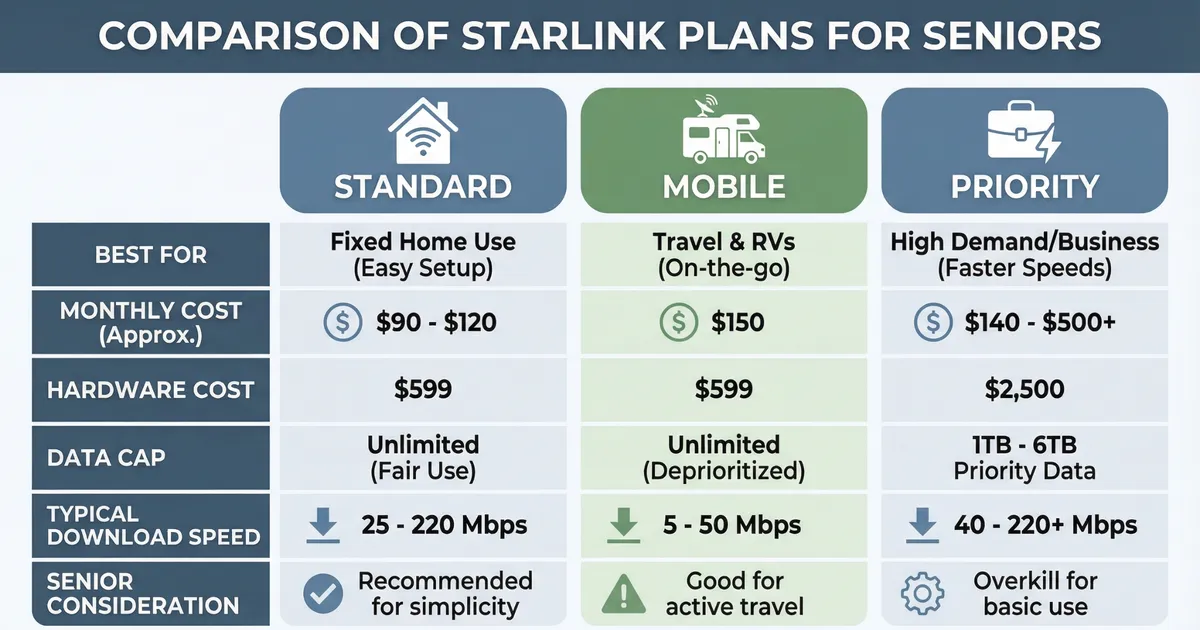
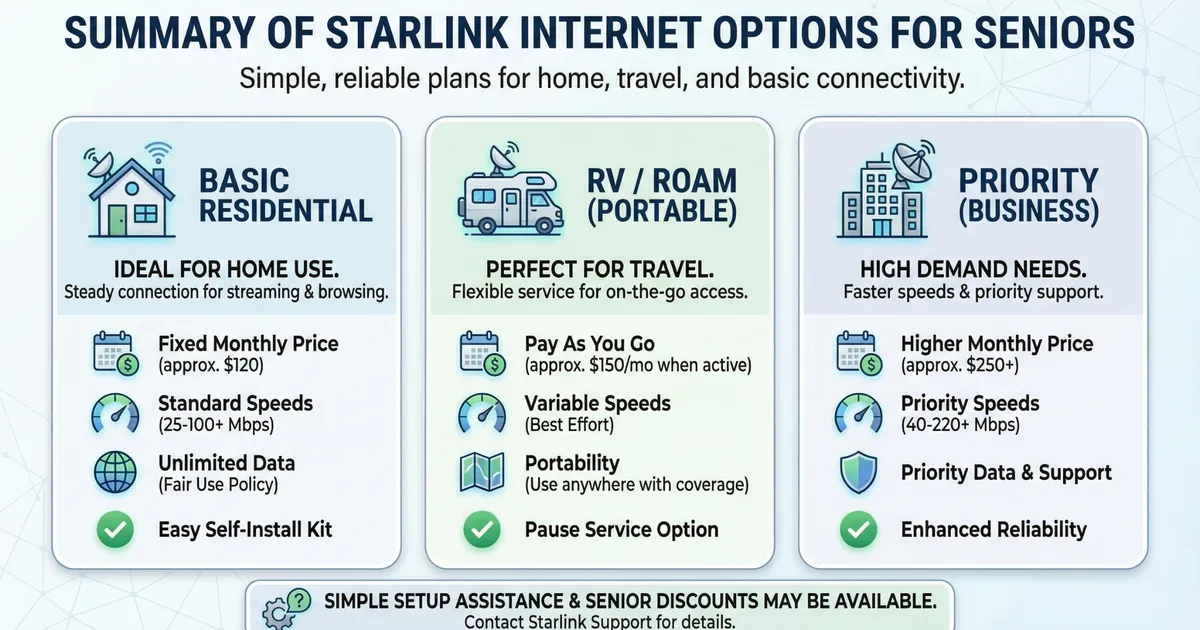
1. Standard Plan (Home Use)
This is the most common plan for everyday household browsing. For availability by region, BroadbandNow’s Starlink overview provides helpful comparisons with other providers.
2. Standard Mobile Plan
Perfect for travel, RV living, or long trips. Users who enjoy staying connected while traveling may also be interested in safety apps listed in our AI Agents Explained: Guide to Autonomous AI in 2026.
3. Priority Plan (High-Usage Homes)
Ideal for larger households, shared homes, or frequent video chatting.
4. Community Connections
Useful for small neighborhoods or independent living communities seeking shared connectivity options.
Costs & What To Expect
1. Equipment Purchase
The package includes a dish, stand, router, and cables. Helpful guidance for understanding broadband expectations is available through the FCC consumer internet information page.
Step-by-Step Setup Guide for Older Adults
Step 1: Unbox and Identify Each Component
The package includes a dish, stand, power cables, and a router. The Starlink app shows visuals for each piece to help simplify setup.
Step 2: Choose a Clear Outdoor Area
The dish needs a clear view of the sky for the best connection. Seniors can place it in the yard, on a porch, or on the roof with help from a family member.
Step 3: Follow App Instructions
The Starlink app guides users step-by-step. Once everything is plugged in, the device connects automatically without complicated settings.
Step 4: Test and Adjust
The app shows signal quality so seniors can adjust placement until the connection is stable.Speedtest by Ookla – Global Satellite Internet Insights
Tips for Seniors to Get the Best Experience
1. Keep the App Installed
It provides updates, connection checks, and simple troubleshooting.
2. Use Voice Assistants
Pair Starlink with Alexa or Google Assistant for hands-free help.
3. Protect the Equipment
A small cover or shield helps protect the dish from weather debris.
4. Ask Family Members for Assistance
Installation and maintenance become easier with help from loved ones.
Frequently Asked Questions
1. Is Starlink easy for seniors to use?
Yes. Starlink is designed with simple setup steps and minimal maintenance.
2. Does Starlink work in rural areas?
Yes. It is specifically useful in remote or low-coverage regions.
3. Do seniors need technical knowledge to install it?
No. The Starlink app walks users through each step with visuals.
4. Is the connection stable for video calls?
Yes. The service supports clear video calls, which seniors often use for family chats or online appointments.
5. Are there contracts?
No contracts are required, allowing flexibility for seniors.
Common Mistakes Seniors Should Avoid
Placing the dish under trees or roof overhangs
Ignoring app alerts about weak signal
Forgetting to check cables after storms
Mounting the dish too low to the ground
Not updating the app when new features arrive
Conclusion
Starlink is a powerful and reliable option for seniors who need simple, accessible internet with good speeds and wide coverage. It helps older adults stay connected, attend virtual appointments, enjoy entertainment, and communicate with family without dealing with complicated technology. With multiple plans and flexible pricing, Starlink offers a senior-friendly experience that fits different lifestyles, making it a practical choice for 2026 and beyond.
Frequently Asked Questions
This guide is written especially for seniors (and anyone who prefers plain, simple language ). We’ll cover: What Starlink is and how it’s different from regular internet The main Starlink internet packages, explained in easy terms What costs to expect and what equipment you’ll need How to choose a plan and sign up safely Starlink is an internet service created by SpaceX.
Never Miss an Update
Join thousands of readers getting the latest insights on technology, business, and digital marketing.